
Understand your AI usage: every agent, model, and request
AI Usage Tracking: The Enterprise Guide to Visibility, Cost Control, and Observability
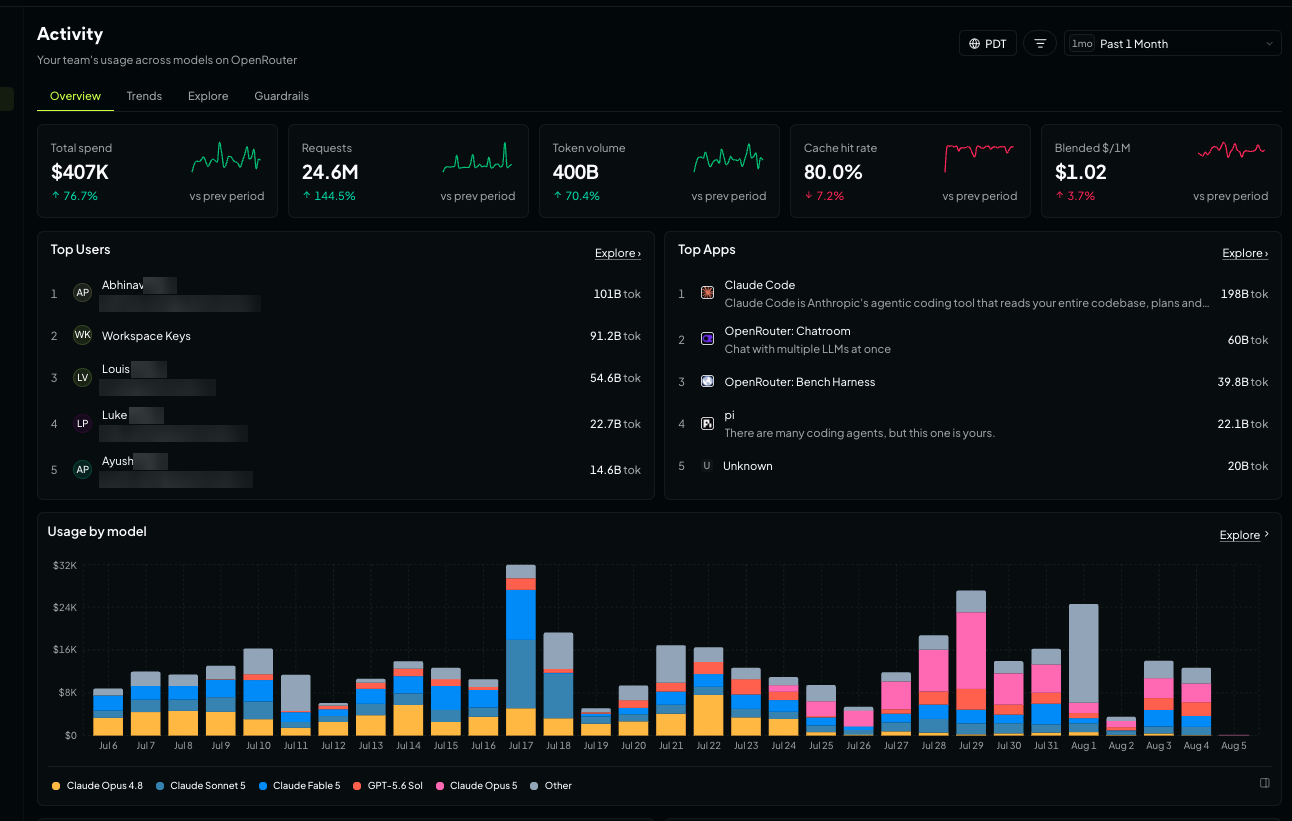
AI usage tracking has become a strategic requirement for any serious deployment. As teams move beyond simple single-prompt calls into agentic workflows that chain models, tools, and retries, the old habit of counting individual API requests no longer tells the full story. One user-facing action in a modern AI assistant can trigger dozens of underlying model calls, and unless you have granular observability, you cannot control costs, debug failures, or prove ROI. This guide explores what comprehensive AI usage tracking looks like in production and shows how a unified gateway such as CCAPI simplifies the entire process—from capturing telemetry to allocating spend by team, feature, and customer.
The Shift from Single API Calls to Agentic Workflows
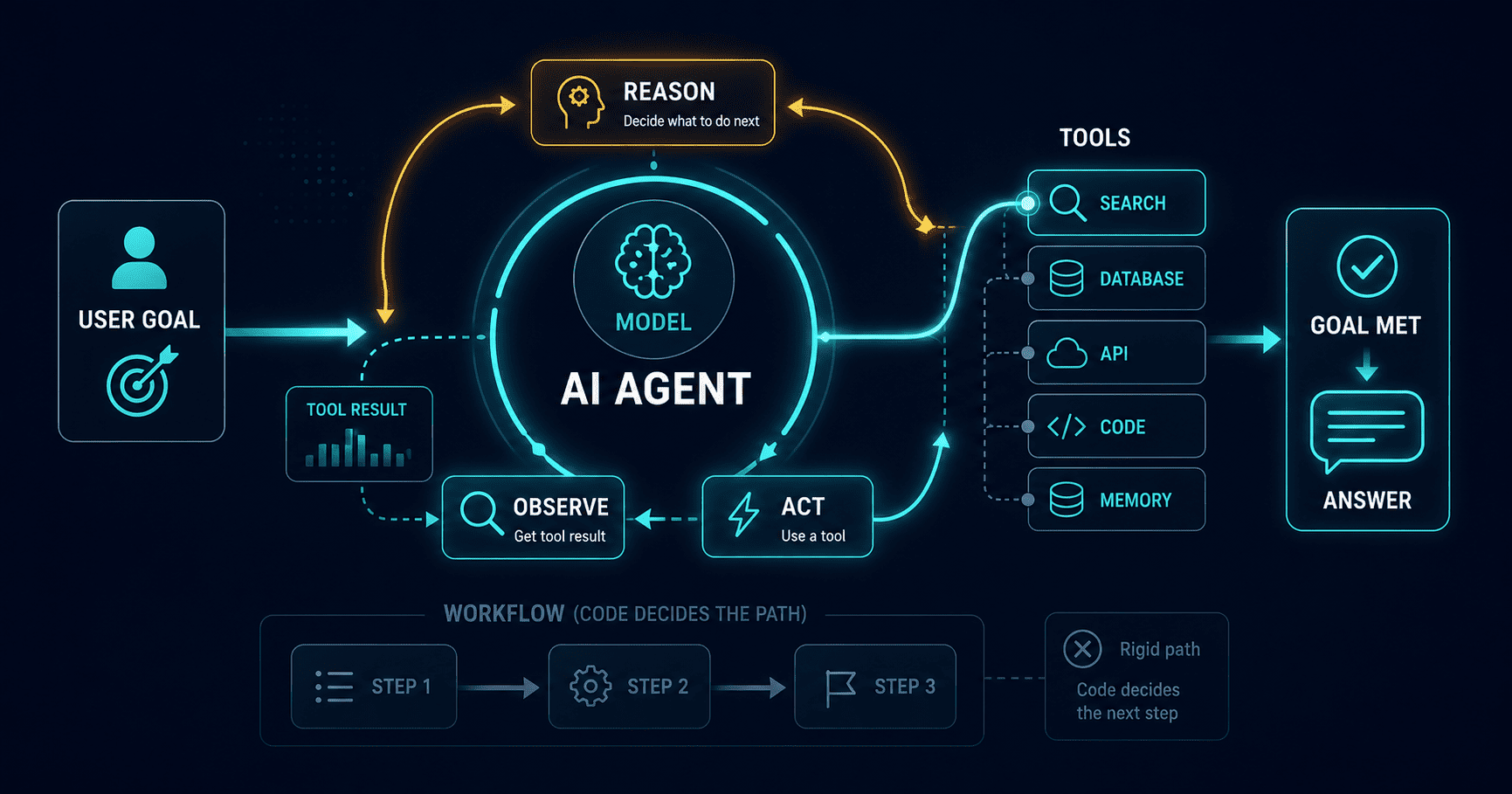
Pre-2024, most AI integrations were straightforward: send a prompt, receive a completion, log the token count. That model breaks down when you deploy agents. A single “agent turn” often includes an initial planning call, several tool invocations, memory retrieval, re-prompting after tool results, and a final response synthesis. Each of those steps may call a different model, use streaming, hit a cache, or trigger a fallback when a provider returns an error.
In practice, I’ve seen production prompts that appear simple on the surface but generate 20 or more API requests under the hood. If you only track at the “user request” level, you cannot tell which provider served the reasoning step, how much token spend came from a retry, or whether a cached system prompt saved you money. That’s why AI usage tracking must happen at multiple levels: individual requests, agent sessions, and business transactions.
What Enterprises Lose Without Usage Visibility

Without a solid tracking strategy, organizations face several dangerous blind spots.
Shadow AI is one of the biggest. Developers and product teams often sign up for API keys directly, bypassing procurement and security reviews. Finance sees a confusing stream of provider invoices, but nobody can map that spend to a product line or customer. Worse, when model selection is left to individual engineers, teams frequently default to a large, expensive model for tasks that a cheaper, faster model could handle.
Inefficient model routing silently inflates costs. Suppose a classification task uses GPT-4-class reasoning when a smaller model achieves the same accuracy. That choice doubles or triples your cost per call without improving quality. Without per-task usage data, leadership cannot make evidence-based decisions about which model should handle which workload.
Cost forecasting also suffers. If you cannot see historical token consumption by model, team, and time of day, predicting next month’s spend is guesswork. One enterprise platform I worked with discovered that a nightly batch job accounted for 40% of their monthly AI bill—simply because nobody had instrumented it.
How CCAPI Fits Into the Modern AI Stack
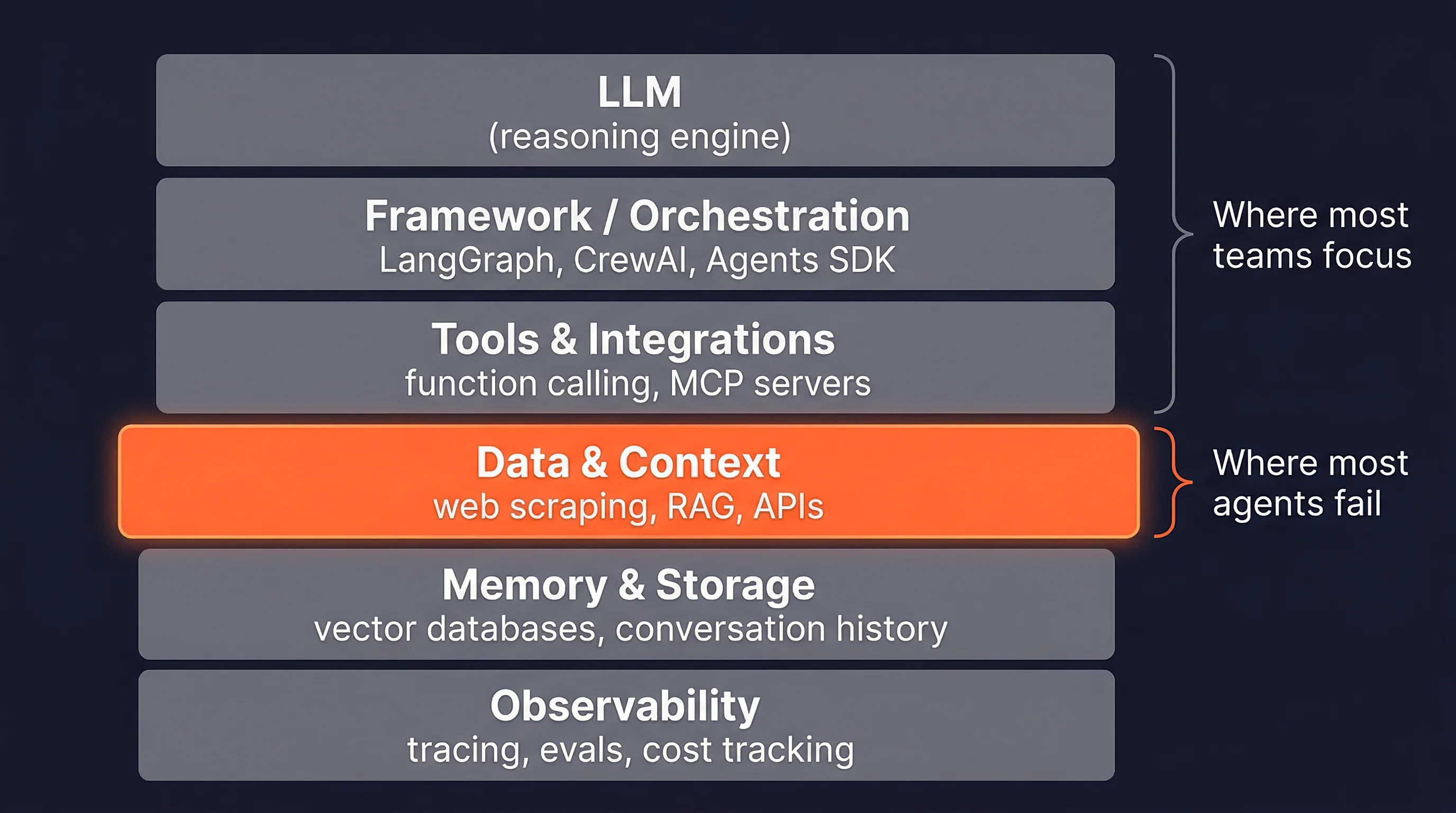
CCAPI is a unified multimodal API gateway that connects your application to models from OpenAI, Anthropic, Google, and many others through one standard interface. It supports text, image, audio, and video generation, with transparent pricing and zero vendor lock-in. For teams looking for an OpenRouter alternative, CCAPI stands out because it provides consistent usage telemetry across every provider and model in its catalog.
Rather than maintaining separate SDKs and dashboards for each AI vendor, you send all requests through one gateway. That means you can track tokens, latency, errors, and cost in a normalized format regardless of whether the underlying model is GPT, Claude, Gemini, or a specialized image generation model like nano banana. Later in this article, we’ll see why this gateway-level approach is the most reliable foundation for AI usage tracking.
Defining the Scope: Every Agent, Model, and Request

AI Usage Tracking at the Agent Level
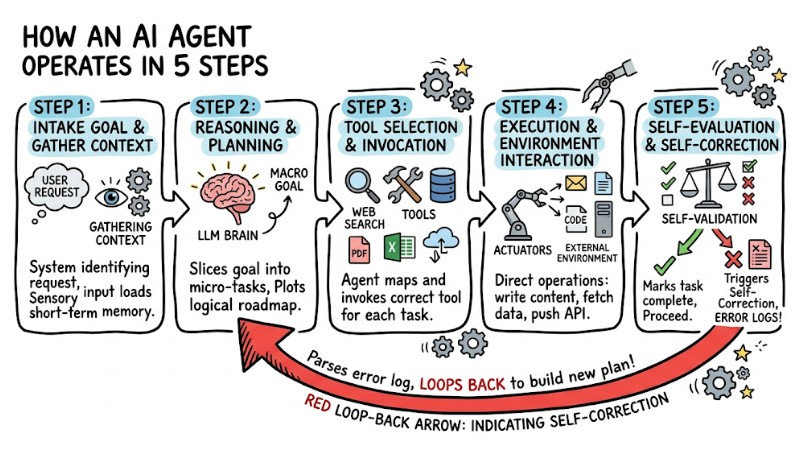
Agent-level tracking means you can answer questions like: “How much did this entire user task cost?” and “Which sub-step consumed the most tokens?” To make that possible, you need a consistent correlation strategy.
The standard pattern is parent-child request IDs. When an agent begins a task, generate a parent trace ID representing the end-to-end goal. Every model call, tool call, retry, and fallback inside that task receives a child ID that references the parent. Then you can aggregate costs and latency across the entire agent turn rather than looking at isolated requests.
A common mistake is to only log the final response. But by the time the user sees an answer, your agent may have run three tool calls and a summarization pass. If you don’t capture the full tree, you have no idea where the budget went.
Model Attribution Across Multi-Step Tasks
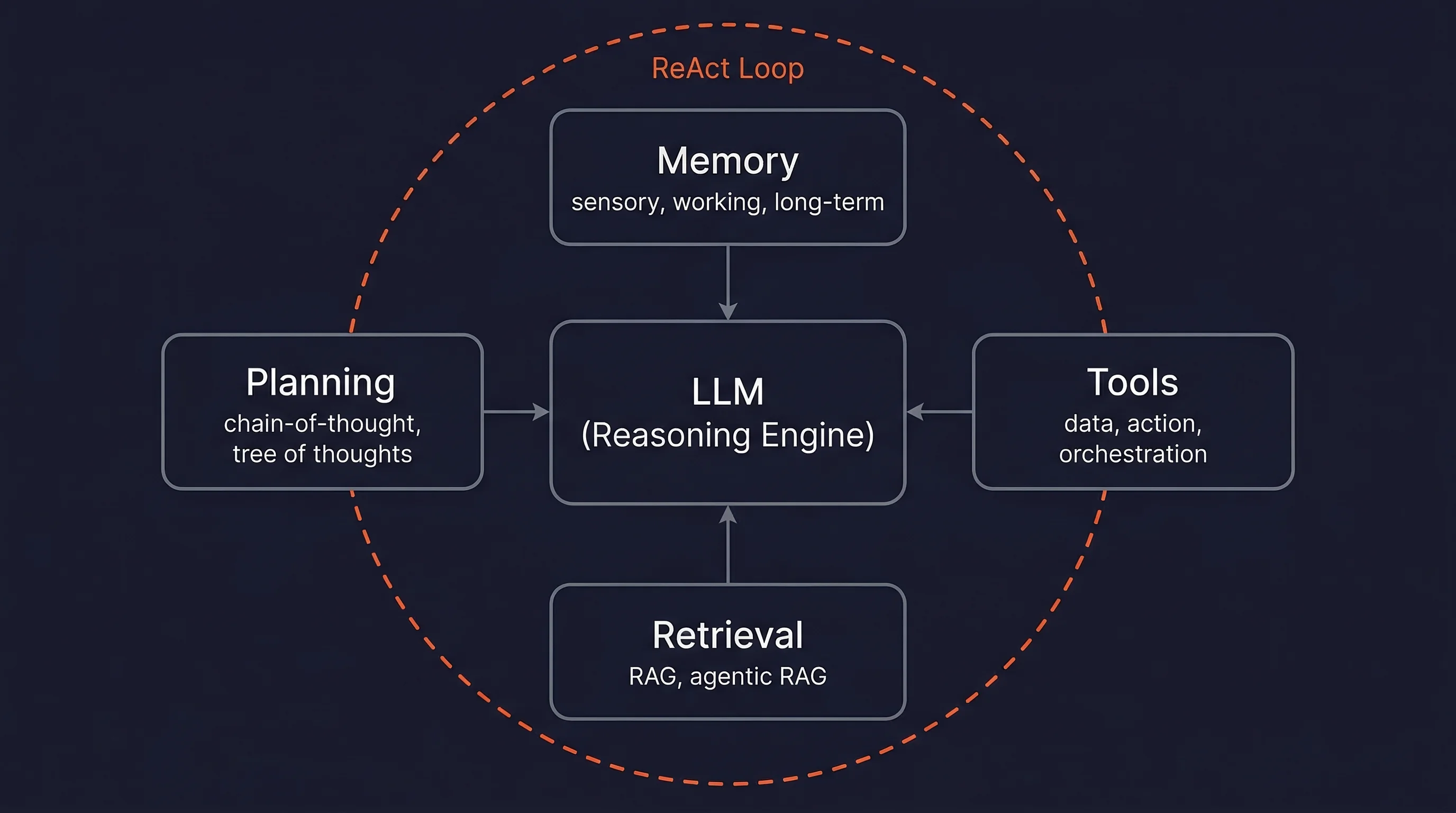
When routing logic decides which model handles which part of a workflow, attribution becomes trickier. For example, an agent might use a cheap embedding model for retrieval, a mid-tier model to parse the query, and a frontier model for final reasoning. If you only log the last model, you lose the cost and latency profile of the retrieval step.
The solution is to record model name, version, and provider at every span. This is especially important when you use a gateway that dynamically selects models based on availability, price, or latency. The tracking layer must normalize provider responses into a common schema so that every span contains the same fields—model, request ID, token counts, and status code—regardless of the upstream API.
Request Lifecycle: From Prompt to Response to Retry
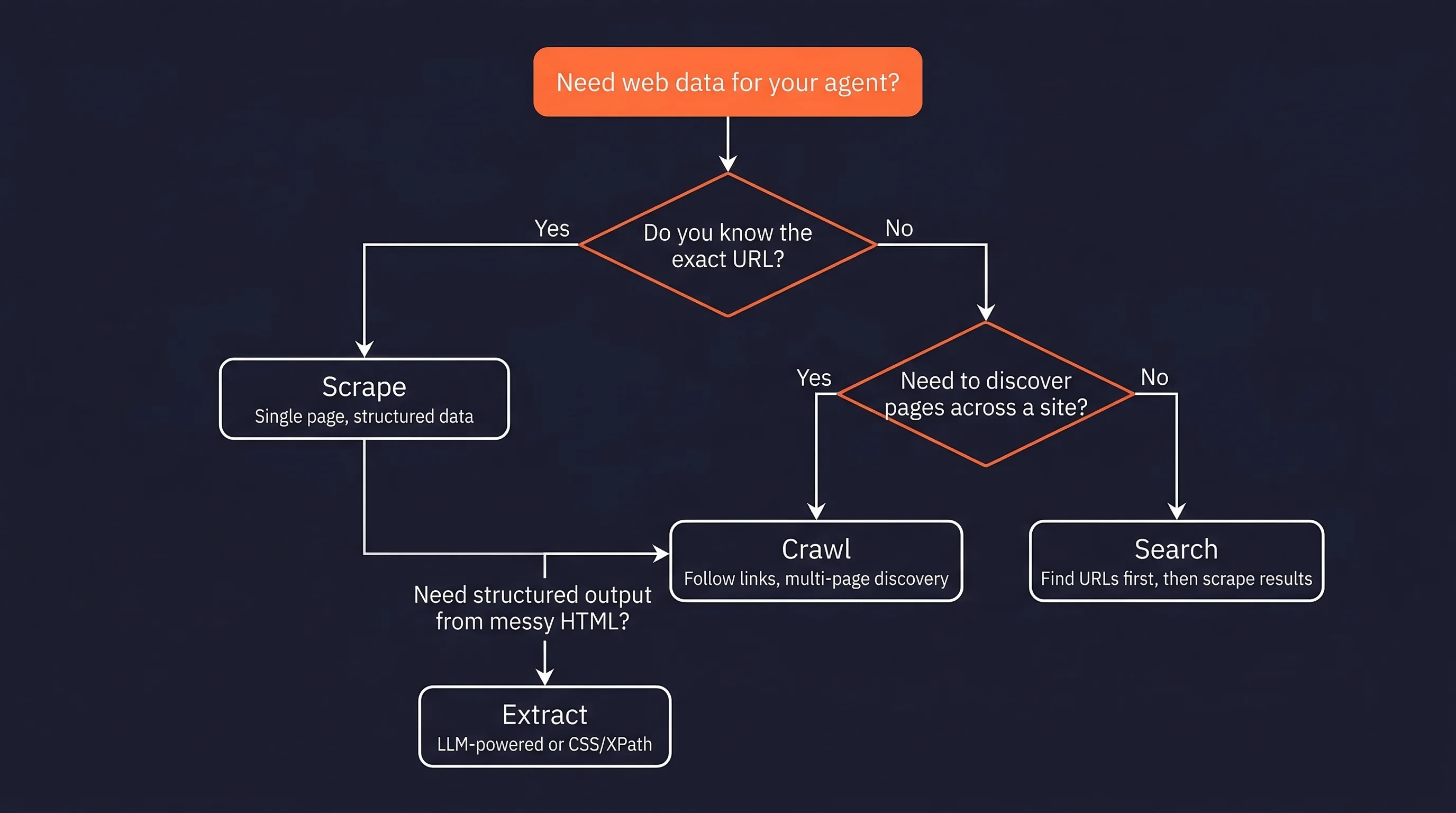
Every AI request passes through distinct phases: prompt ingestion, tool invocation (if applicable), model completion, streaming token delivery, caching, and potentially fallback/retry logic. Each phase can produce different observability data.
For instance, a streamed response generates token events over time, while a non-streamed request produces a single completion payload. Cache hits may return zero prompt tokens but still incur a service fee. Retries can double or triple the effective cost of a single logical request. If your tracking system treats a retry as a brand-new request, you will overcount usage. Instead, you should assign a shared request group ID that links the original attempt and all retries together.
AI Model Observability: Moving Beyond Token Counts
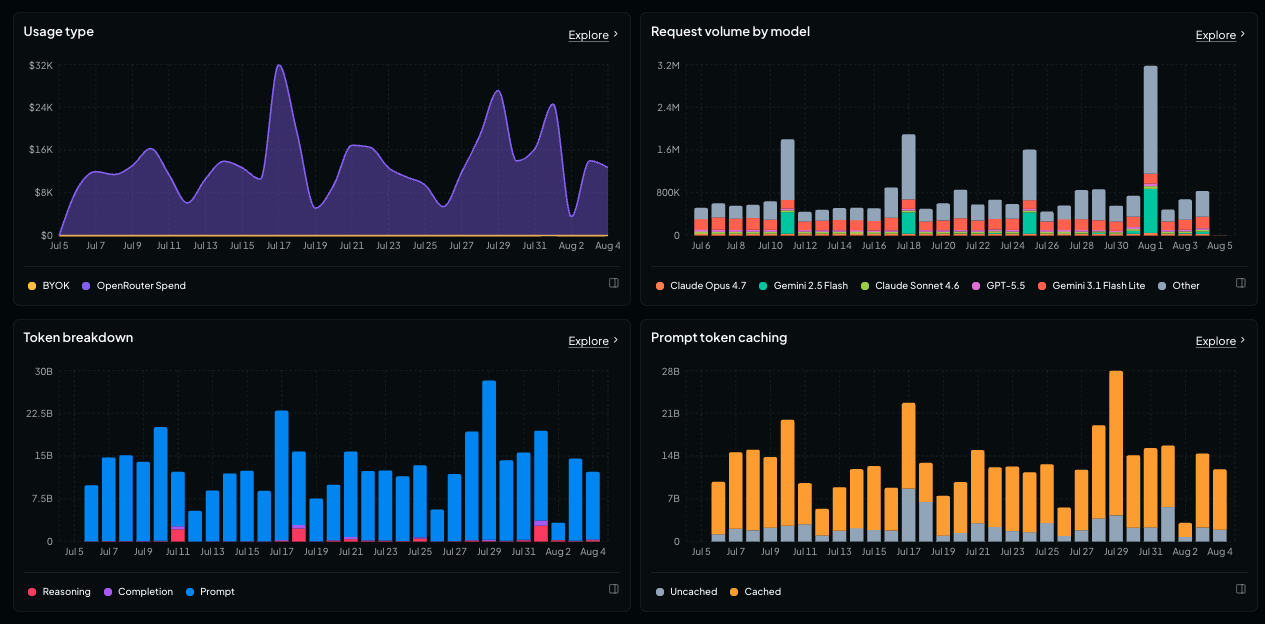
Key Telemetry Signals for AI Model Observability
Token counts are necessary, but they are not sufficient for enterprise observability. You also need latency, time-to-first-token, error rates, cache hits, quality scores, and cost per request. The table below summarizes the signals that matter most.
| Signal | Why It Matters |
|---|---|
| Input/output tokens | The foundation of cost calculation and capacity planning |
| Time-to-first-token | Directly impacts perceived user experience |
| Total latency | Affects timeout budgets and agent-step orchestration |
| Error rate | Detects provider outages, rate limits, and bad prompts |
| Cache hits | Explains why some requests are cheaper than others |
| Quality score | Helps correlate model version with completion quality |
| Cost per request | The bottom line for finance and product teams |
These signals become especially valuable when they are tied to a single trace ID. That way, you can see that a particular agent step had high latency because it hit a cold model endpoint, or that a response was cheap because it used a cached prompt.
Tracing Requests Across Providers and Models
Distributed tracing is a well-known practice in microservices, and AI workloads benefit from the same principles. You need trace IDs, span-level metadata, and a way to normalize provider responses so that teams can compare models side by side.
OpenTelemetry provides a useful mental model: each span represents a unit of work, and spans are nested under a parent trace. In AI usage tracking, the trace could be the agent turn, and spans could be the individual model calls, tool invocations, and retries. By adopting OpenTelemetry’s context propagation patterns, you can carry trace IDs through asynchronous worker queues and serverless functions where standard HTTP middleware often fails.
Correlating Business Outcomes with Model Performance
The highest level of observability connects technical signals to business outcomes. Suppose your support chatbot shows a 20% reduction in time-to-first-token after moving to a smaller model. That sounds good, but does it reduce user frustration? If you can correlate latency with customer satisfaction scores or ticket deflection rates, you can prove the business value of a model change.
In practice, this means tagging every request with a business transaction ID. You can then ask: “Do users who received faster responses have higher conversion rates?” or “Does the higher-cost model actually reduce refund requests?” AI usage tracking becomes a strategic tool when it answers these questions, not just cost questions.
Enterprise AI API Analytics: Metrics That Matter
Cost, Latency, and Quality Metrics per API Call
Enterprises should standardize on a small set of metrics that everyone agrees on. A good starting point includes:
- Cost per successful request – not total cost, because failed requests should be fixed, not budgeted for.
- Tokens per task – reveals whether prompts are bloated or agent loops are inefficient.
- Error budget – the maximum acceptable share of failed requests you can tolerate.
- Quality threshold – a minimum score for validation tests, human ratings, or automated evaluation.
Without standardization, different teams will measure different things. One team might log token counts, another might only capture cost, and a third might ignore errors entirely. That makes cross-team comparison impossible.
Analyzing Usage Trends by Team, Feature, and Project
Raw usage data becomes useful when you add metadata. Every API call should include tags for team, product line, feature name, customer ID, environment, and model purpose. These tags enable pivoted analysis: “How much does our recommendation feature cost per user?” or “Which team is spending the most on image generation?”
CCAPI’s gateway layer makes this straightforward because you can define custom metadata at the request level. When the request passes through the gateway, that metadata is preserved and exported to your analytics pipeline. That means you don’t have to parse vendor-specific logs to recover context that was lost at the provider boundary.
Building Executive-Ready Dashboards for AI Consumption
Executives don’t want raw logs. They want answers. A useful AI consumption dashboard should show:
- Monthly spend by provider and model
- Efficiency metrics such as cost per successful request
- Top-consuming teams and features
- Anomaly alerts for sudden spend spikes or error bursts
The goal is to make AI usage visible in the same way cloud infrastructure spend is visible. Instead of “we spent $50,000 on APIs,” the dashboard should say “$20,000 on OpenAI, $15,000 on Anthropic, $10,000 on Google, and $5,000 on image generation—with cost per successful request trending down 8% this month.”
Unified AI API Spend Management: Control and Optimization
How a Unified View Reveals Hidden Spend
Using multiple AI providers directly creates a fragmented cost picture. Each vendor has its own dashboard, billing cycle, and pricing rules. Aggregating that data manually is error-prone and time-consuming. A unified gateway removes those blind spots because every request, for every model, flows through one place.
When we’ve helped teams audit production agent pipelines, redundant calls and ineffective model routing typically inflate spend by 20–30%. One common pattern is an agent that re-sends the same system prompt on every tool call. Another is a fallback policy that retries a request with the same model, even though the original request was deterministic and will fail again. A unified view makes these inefficiencies impossible to ignore.
Allocating Costs to Agents, Products, and Customers
Cost allocation is about fairness and clarity. If your platform offers AI features to customers, you need to know exactly how much each customer consumes. Without metadata, you have to rely on rough estimates, which can lead to underbilling or oversubsidizing.
With proper tagging, you can allocate costs at the agent level, product level, or even per tenant. This enables usage-based pricing, internal chargebacks, and capacity planning. In one project, we used customer IDs in the metadata to discover that 5% of users consumed 40% of AI spend—which justified moving to a metered pricing plan.
Setting Budgets and Alerts with CCAPI
CCAPI’s transparent pricing and gateway-level controls make cost governance easier. You can set monthly budget thresholds, monitor usage by model, and receive alerts before a runaway prompt or an infinite agent loop blows your spend. Because the gateway sits between your application and every provider, it can enforce quotas without requiring changes to your application code.
For example, you could configure an alert that fires when a single agent trace exceeds $0.50, or when total daily spend crosses a predefined limit. You can also route requests to cheaper models automatically when usage spikes. These controls are essential for enterprises that want to move fast without sacrificing financial discipline.
How to Implement AI Usage Tracking in Your Stack
Step 1: Instrument Every Request at the Gateway Layer
The gateway is the only place where every request is guaranteed to pass through, regardless of which provider or model serves it. If you instrument your application code directly, you will miss requests from other services, background jobs, or developer experiments. By instrumenting at the gateway, you capture a single source of truth.
Step 2: Normalize Provider Data into a Common Schema
OpenAI, Anthropic, and Google all return usage data in slightly different formats. Some report token counts as integers, others include extra fields, and streaming responses may not include final token counts until the stream ends. Normalization means converting every provider response into one consistent schema so that downstream dashboards do not need to understand vendor-specific quirks.
Step 3: Enrich with Metadata for Agent, Model, and Request Context
Raw usage records are hard to analyze without context. Add custom fields for session IDs, user IDs, feature flags, and environment labels. The earlier you enrich this data in the pipeline, the easier it is to segment analysis later. You can also add a model purpose tag such as “reasoning,” “summarization,” or “image generation” to understand which capabilities drive cost.
Step 4: Build a Reporting and Alerting Loop
The final step is to turn raw usage data into actionable insights. Set up weekly reports for engineering managers, real-time dashboards for on-call engineers, and automated alerts tied to spend thresholds. The loop only works if you continuously review the data and adjust model routing, caching, and agent design accordingly.
Technical Deep Dive: Understanding the Request Lifecycle
Anatomy of a Single AI Request
Let’s break down a real request. An application calls the /chat/completions endpoint with a prompt of 1,200 tokens and a max_tokens setting of 500. The gateway forwards the request to a model, which returns 350 tokens in a streaming response. The tracking system records input tokens, output tokens, latency, time-to-first-token, and cost. If the provider returns an error, the gateway may retry with the same model or fall back to a different model. All of those events need to be correlated.
How Agent Loops Multiply Usage
Agents multiply usage in surprising ways. A single turn might include:
- A system prompt to understand the goal
- A tool call to search a database
- The tool result re-sent to the model for analysis
- A second tool call to fetch more information
- A final response generation
Each step can generate thousands of tokens. Poorly designed loops can also generate duplicate token spend. For example, a re-prompt that includes the entire conversation history each time will grow linearly, or worse, exponentially. Caching can reduce cost, but only if the cache key is stable and the prompt is reused verbatim.
Handling Streaming, Caching, and Async Calls in Usage Tracking
Streaming responses, cached prompts, parallel tool calls, and asynchronous batch jobs can all break naive tracking logic.
- Streaming: You may not know the final token count until the stream ends. Track the stream as a single logical request, not as a series of independent chunks.
- Caching: If a provider caches the prompt, you still pay a smaller fee, but the token count may appear lower. Record cache hits separately so you can show true savings.
- Parallel tool calls: Many agents invoke multiple tools concurrently. Give each tool call its own child span, but group them under the same parent trace.
- Async jobs: Batch inference often runs in background queues. Use trace context propagation to carry request IDs across service boundaries.
Real-World Implementation: Lessons from Production
Case Study: Tracking a Multi-Agent Workflow
Imagine an insurance chatbot that handles claims. The agent first calls an embedding model to retrieve relevant policy documents, then calls a reasoning model to interpret the claim, then calls a text-to-video generation model to produce a short explanation video for the customer, and finally sends a summary via email.
Without proper tracking, you would see four unrelated API calls. With agent-level tracking, you see one trace with four spans. The telemetry shows that 70% of the cost came from the video generation model, and that the reasoning model was over-provisioned for this task. That insight leads the team to switch to a smaller reasoning model, cutting total cost by 30% without changing the customer experience.
Common Pitfalls to Avoid in AI Usage Tracking
- Ignoring retried requests: A retry is not a new request; it is part of the same logical operation.
- Forgetting to track cached tokens: If you don’t record cache hits, you cannot explain sudden cost drops or evaluate caching ROI.
- Double-counting streaming responses: Counting each chunk as a separate request inflates your metrics.
- Failing to include metadata: Without metadata, you cannot slice the data by team, feature, or customer.
- Storing prompts without redaction: Sensitive user data can leak into your logs, creating compliance problems.
Lessons Learned from Scaling Enterprise AI Analytics
As you scale, several things will surprise you. First, data volume grows fast. Each agent trace can generate hundreds of spans, and high-traffic products can produce millions of events per day. You need a pipeline that can handle cardinality and high write throughput.
Second, schemas will evolve. New models introduce new fields, and you will need to maintain backward compatibility. Third, cross-team governance matters. If every team uses different tag names, your dashboards will be meaningless from day one. Establish naming conventions early. Finally, build trust in the numbers. If your metrics disagree with vendor invoices, people will stop using the dashboards. Invest time in reconciliation so that tracked spend matches actual spend.
Build vs. Buy: When to Use a Unified AI API Gateway
Pros and Cons of Building vs. Buying Usage Tracking
Some teams decide to build their own usage tracking layer. If you already have a robust observability infrastructure and dedicated platform engineers, that can work. But you will need to handle provider SDK updates, parse inconsistent response formats, manage retries, and maintain your own dashboards.
Using a gateway like CCAPI shifts most of that burden to the platform. You get a common API, unified usage records, and built-in cost controls. The table below summarizes the trade-offs.
| Consideration | Build In-House | Use a Unified Gateway |
|---|---|---|
| Time to production | Weeks to months | Days |
| Maintenance effort | High | Low |
| Multi-provider coverage | Manual | Native |
| Cost allocation | Build from scratch | Built-in metadata support |
| Vendor lock-in risk | Depends on your code | Low, thanks to standardized API |
| Accuracy of usage data | Depends on instrumentation | High, because all traffic passes through the gateway |
Evaluating Enterprise AI API Analytics Solutions
If you are evaluating a solution, look for these capabilities:
- Multi-provider support for all models you use today and may use tomorrow
- Granular metadata so you can tag requests by team, feature, and customer
- Cost allocation at the agent, product, or tenant level
- Alerting for spend thresholds and error anomalies
- Privacy controls to redact sensitive data before storage
- Ease of integration with your existing observability stack
The CCAPI Advantage: Transparent Pricing and Zero Lock-in
CCAPI simplifies AI usage tracking and spend management by routing all requests through one gateway. Because it supports models from OpenAI, Anthropic, and Google, plus a wide range of specialist models, you can experiment freely without re-architecting your application. There are no hidden fees, and you can export your usage data whenever you want. That combination of transparency and neutrality makes CCAPI a strong foundation for an enterprise AI strategy.
Industry Best Practices for AI Usage Tracking
What the Experts Say About Cost Observability
The industry is moving toward treating AI spend like cloud spend. The FinOps Foundation’s framework emphasizes visibility, allocation, and continuous optimization. AI usage tracking follows the same discipline: you cannot manage what you cannot see, and you cannot optimize what you do not allocate. Leading teams now have dedicated AI cost reviews, just as they have cloud cost reviews.
Aligning with Security, Privacy, and Compliance Requirements
AI usage logs are a double-edged sword. They help you debug, but they can also capture sensitive information from prompts and responses. Enterprises must redact PII and confidential data before logs enter a warehouse. You also need to respect data retention policies and ensure that usage logs meet compliance standards such as SOC 2 or HIPAA where applicable.
A good tracking pipeline should allow you to strip or transform sensitive fields while preserving the metadata needed for analytics. Never store raw prompts in your analytics database unless you have a clear security reason and the proper controls in place.
Future-Proofing Your AI Usage Strategy
The AI landscape is changing quickly. New models, new modalities, and increasingly complex agentic workflows are emerging all the time. As agents connect to external tools through MCP server protocols, tracking needs to span beyond model calls to include tool invocations and tool outputs. A future-proof strategy should be model-agnostic, metadata-rich, and capable of ingesting events from many sources.
If you build your tracking framework with those principles in mind, you will be able to adopt the next wave of AI capabilities without tearing down your observability stack. Start small, focus on a few core metrics, and expand as you learn what your organization needs.
AI usage tracking is no longer optional. It is the foundation for cost control, operational reliability, and strategic decision-making. By instrumenting at the gateway layer, normalizing provider data, and enriching every request with context, you can turn AI consumption from a mystery into a manageable, measurable business asset.