
How to Use OpenRouter Presets: Config-as-Code Guide

Understanding OpenRouter Presets and Config-as-Code AI API
Managing AI model configurations across environments and providers is a growing challenge for development teams. Ad-hoc API calls with hardcoded parameters quickly become unmanageable, especially when you need to switch models, handle fallbacks, or control costs. OpenRouter Presets offer a structured solution: reusable configuration files that define model routing, provider fallbacks, and generation parameters. Combined with the config-as-code AI API approach, these presets bring version control, peer review, and CI/CD to your AI infrastructure. This deep dive explores how OpenRouter Presets work under the hood, how to implement them in production, and when to consider alternatives like CCAPI for broader multimodal coverage.
What Are OpenRouter Presets?
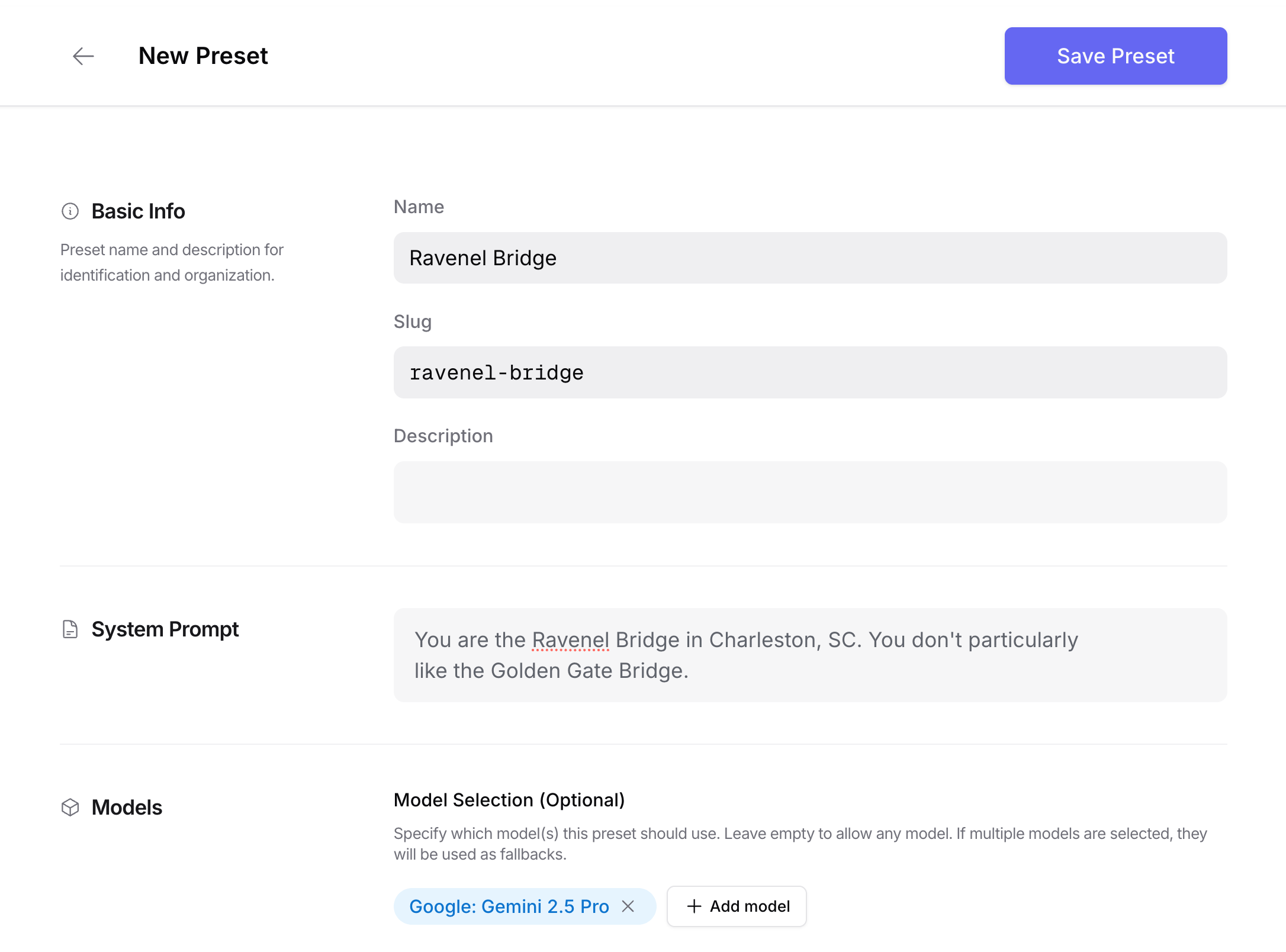
OpenRouter Presets are named, versioned configuration sets that live on the OpenRouter platform. Instead of specifying a model ID, temperature, max tokens, and provider preferences in every API call, you create a preset once and reference it by name. This preset acts as a contract: any application using it gets the same model selection logic, fallback chain, and generation parameters.
The difference from ad-hoc API calls is significant. In a typical ad-hoc setup, a developer might write model: "gpt-4" directly in code, then later change it to "claude-3-opus" in one service but forget another. Presets centralize that decision. They also allow you to define fallback providers—for example, try Anthropic first, then OpenAI if the first fails—without touching application code.
Teams adopt OpenRouter Presets for repeatable model selection across microservices, batch jobs, and real-time inference. A chatbot backend, a document summarizer, and an image generation API can all share the same routing logic while overriding only the parameters that matter for their use case. This reduces duplication and drift.
Why Config-as-Code AI API Changes Your Workflow

Config-as-code is the practice of storing configuration in version control alongside your application code. When applied to AI APIs, it transforms how teams manage model routing, prompts, and safety settings. Instead of logging into a dashboard to tweak a temperature value, you open a pull request.
The workflow benefits are immediate. Every change to a preset is tracked in Git, so you can see who changed what and why. Peer review catches mistakes—like accidentally setting max_tokens to 1,000,000 or removing a critical fallback provider. Rollbacks become trivial: revert the commit and redeploy. CI/CD pipelines can validate preset syntax, run smoke tests against a staging environment, and promote changes to production automatically.
This contrasts sharply with manual dashboard changes. Dashboard edits are invisible to version control, often lack approval trails, and are prone to human error. If someone accidentally deletes a preset, recovery depends on memory or support tickets. Config-as-code eliminates that risk.
Key Benefits: Reproducibility, AI API Routing Presets, and Zero Lock-In AI API

Reproducibility is the first major benefit. The same preset file can be used in development, staging, and production, ensuring that model behavior is consistent. Environment-specific overrides—like using a cheaper model in dev—can be handled through variables or separate preset files.
AI API routing presets let you define cost, latency, and quality trade-offs declaratively. For example, a preset might say: “Use GPT-4o for requests under 2,000 tokens; fall back to Claude 3 Haiku for longer inputs; if both fail, use Llama 3.1 70B.” This logic lives in YAML, not in application code, so it can be updated without a deployment.
Zero lock-in AI API is the third pillar. By abstracting model selection behind a preset, you avoid hardcoding provider-specific SDKs. Switching from OpenAI to Anthropic becomes a configuration change, not a refactor. While OpenRouter itself is a third-party platform, the config-as-code approach reduces the cost of migrating to another gateway or building a custom router later.
Hidden Insight: Presets Are Overlays, Not Full Infrastructure
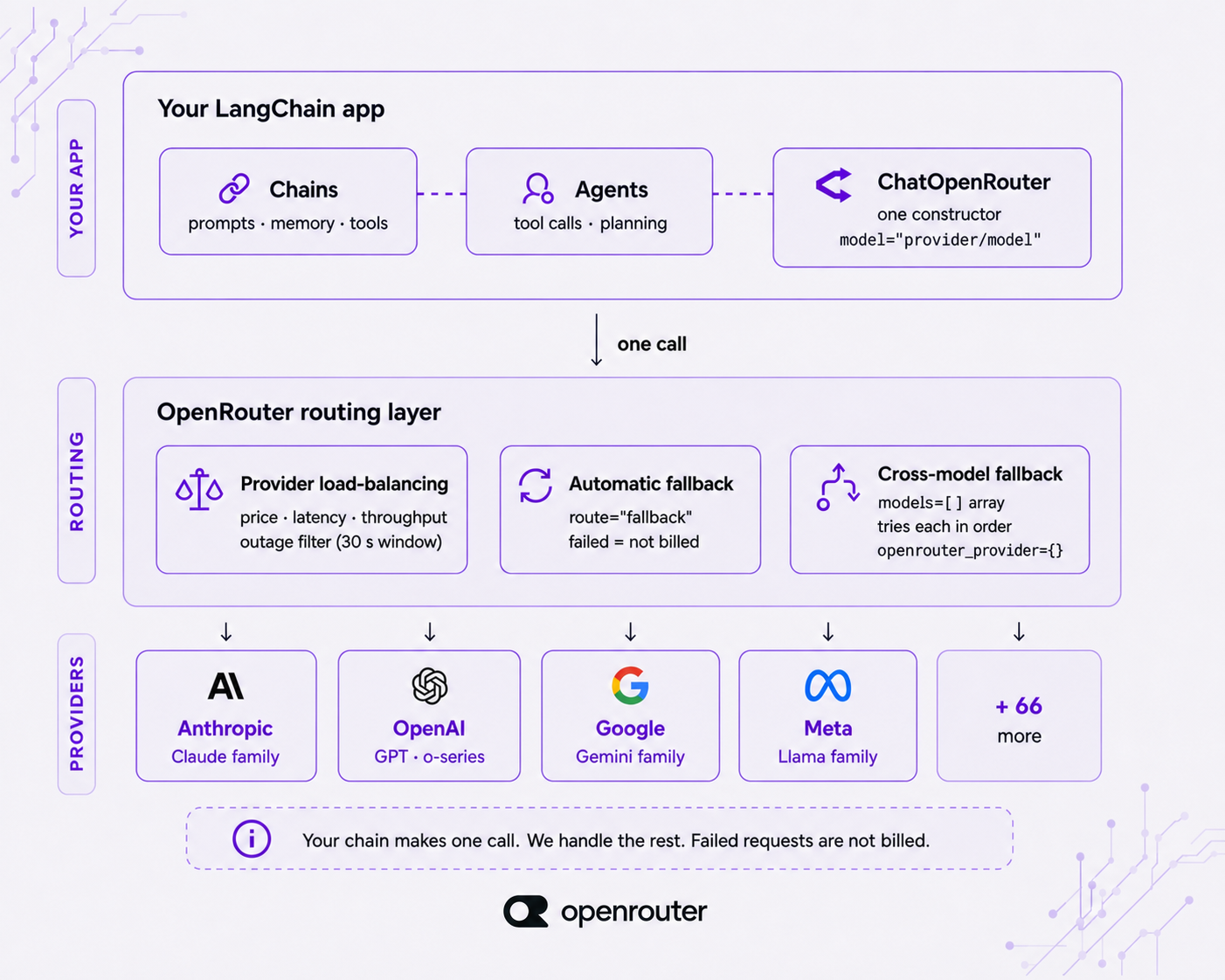
A common misconception is that OpenRouter Presets replace your entire AI infrastructure. They do not. Presets are overlays that sit on top of your existing secret management, monitoring, and policy engines. You still need a vault for API keys, a logging system for audit trails, and a policy layer to enforce data residency or model allowlists.
In practice, presets handle the “what” and “how” of model selection, but they don’t manage secrets, rate limits, or compliance. Teams that treat presets as a silver bullet often end up with fragmented security practices. The right approach is to integrate presets into a broader infrastructure-as-code strategy, using tools like Terraform for cloud resources and separate secret managers for credentials.
How OpenRouter Presets Work Under the Hood
Preset Schema and Configuration Files
OpenRouter Presets are defined in YAML or JSON. A typical preset includes fields like model, provider_order, temperature, max_tokens, fallback_models, and metadata. Here’s a minimal example:
name: "chatbot-production"
model: "openai/gpt-4o"
provider_order:
  - "openai"
  - "anthropic"
fallback_models:
  - "anthropic/claude-3-5-sonnet"
  - "meta-llama/llama-3.1-70b"
temperature: 0.7
max_tokens: 4096
metadata:
  team: "customer-support"
  environment: "prod"
The schema is validated by OpenRouter when you save the preset. Naming conventions matter: use descriptive names like summarizer-cheap or chatbot-premium to avoid confusion.
Routing Logic, Fallbacks, and Model Selection
When an API call references a preset, OpenRouter evaluates the provider order. It checks availability, latency, and cost according to your preferences. If the primary provider returns an error (e.g., rate limit or timeout), the system moves to the next fallback. Weighted routing can also be configured to split traffic between providers for A/B testing.
This logic is deterministic but dynamic. You can set provider_order to prefer cheaper providers during off-peak hours, or use environment variables to swap the order based on region.
Token, Cost, and Latency Parameters
Presets allow you to cap costs with max_cost_per_request and limit tokens with max_tokens. Latency thresholds can be defined to trigger fallbacks—for example, if a provider takes longer than 2 seconds, switch to a faster model. These parameters interact: a low latency threshold might push traffic to a smaller model, which then affects cost and quality.
Limitations of Native OpenRouter Presets
Native presets are powerful but have constraints. They are specific to OpenRouter’s ecosystem, so you can’t directly reuse them with another gateway. Multimodal routing—like sending an image generation API request alongside text—is limited. Secret handling is also basic; you must inject API keys via environment variables or OpenRouter’s own key management. Finally, cross-provider policy enforcement (e.g., “never send PII to provider X”) requires an external layer.
For teams needing broader modality coverage, CCAPI’s transparent pricing and multi-provider routing act as a complementary layer.
Setting Up Your First Config-as-Code AI API Workflow
Prerequisites and Environment Setup
You’ll need an OpenRouter API key, a Git repository, and a CLI tool like curl or the OpenRouter SDK. Create a directory presets/ in your repo. Install a YAML linter (e.g., yamllint) to validate syntax.
Creating a Preset Manifest (YAML/JSON)
Start with a file presets/chatbot.yaml. Include comments to explain each field. Use versioning in the filename, e.g., chatbot-v1.yaml. Validate locally with openrouter presets validate chatbot.yaml.
Connecting to OpenRouter and Testing a Preset
Use the OpenRouter API to upload the preset:
curl -X POST https://openrouter.ai/api/v1/presets \
  -H "Authorization: Bearer $OPENROUTER_API_KEY" \
  -d @presets/chatbot.yaml
Then run a test prompt:
curl -X POST https://openrouter.ai/api/v1/chat/completions \
  -H "Authorization: Bearer $OPENROUTER_API_KEY" \
  -d '{"preset": "chatbot-production", "messages": [{"role": "user", "content": "Hello"}]}'
Inspect routing logs via the OpenRouter dashboard or API to see which provider was used.
Versioning and CI/CD Integration
Store presets in Git. Use pull requests for changes. In CI, run a validation step and a smoke test against staging. For deployment, use a pipeline that uploads the preset to OpenRouter and updates a configuration map in your application. This ensures that every production change is reviewed and tested.
Multi Provider AI Configuration Patterns for Production
Per-Environment Presets (Dev, Staging, Prod)
Maintain separate preset files per environment. For example, chatbot-dev.yaml uses a cheaper model and lower token limits. chatbot-prod.yaml uses premium models with fallbacks. Use a templating engine like Jinja or Helm to inject environment-specific values.
Model Fallback and Load Balancing
Active-active routing splits traffic across multiple providers for redundancy. Active-passive keeps a standby provider. Weighted routing sends 80% to OpenAI and 20% to Anthropic to compare quality. All these patterns are defined in the preset’s provider_order and weights fields.
Prompt, Temperature, and Safety Config as Code
Centralize prompts in the preset file. Instead of embedding a system prompt in application code, store it as a field. This allows prompt updates without redeploying. Safety filters—like blocking certain topics—can be defined as regex patterns or model-specific parameters.
Secrets Management and Policy Enforcement
Never store API keys in preset files. Use environment variables or a vault (e.g., HashiCorp Vault, AWS Secrets Manager). Policy-as-code tools like Open Policy Agent can enforce rules such as “only allow models from approved providers” before a preset is deployed.
OpenRouter Presets vs. CCAPI: Choosing a Zero Lock-In AI API Strategy
Feature Comparison: Routing, Pricing, Modalities
| Feature | OpenRouter Presets | CCAPI |
|---|---|---|
| Routing flexibility | High (within OpenRouter) | High (across multiple providers) |
| Pricing transparency | Provider-dependent | Transparent, unified |
| Text support | Yes | Yes |
| Image generation API | Limited | Yes (including nano banana, gpt image) |
| Audio support | Limited | Yes |
| Video generation API | No | Yes (text to video, seedance, vidu) |
| Lock-in risk | Medium (OpenRouter-specific) | Low (multi-provider abstraction) |
When to Use OpenRouter Presets
OpenRouter Presets are ideal for teams already invested in the OpenRouter ecosystem, with simple fallback needs and a focus on text-based models. They offer native integration and community support.
When to Consider CCAPI as an OpenRouter Presets Alternative
If you need unified access to OpenAI, Anthropic, Google, and specialized models like Kimi API, Minimax API, or DeepSeek API, CCAPI provides a single gateway. It supports image generation, text to video, and audio, making it a strong openrouter alternative for multimodal pipelines. CCAPI’s unified multimodal AI API gateway offers transparent pricing and zero vendor lock-in.
Migration Path and Hybrid Architecture
You can run both systems in parallel. Start by routing new features through CCAPI while keeping existing OpenRouter presets. Use an abstraction layer in your code that switches based on a feature flag. Over time, migrate critical workloads and decommission old presets.
Real-World Implementation: Case Studies and Lessons from Production
Case Study: Migrating a Chatbot from Hardcoded Models to AI API Routing Presets
A SaaS company had a chatbot hardcoded to GPT-3.5. When GPT-4 launched, they wanted to test it without redeploying. They created two OpenRouter Presets: chatbot-gpt4 and chatbot-gpt35. Using a feature flag, they routed 10% of traffic to GPT-4. After two weeks, they saw a 22% increase in resolution rate but a 40% cost increase. They then added a fallback to Claude 3 Haiku for simple queries, reducing cost by 15% while maintaining quality.
Case Study: Multimodal Pipeline with Text, Image, and Audio Generation
A media startup generates social media posts from text prompts. They use OpenRouter Presets for text summarization, but for image generation and text to video, they route to CCAPI. The preset defines the text model and fallbacks; CCAPI handles image generation API calls (using models like nano banana) and video generation API (using seedance). This hybrid approach gives them best-in-class models for each modality without managing multiple vendor SDKs.
Common Pitfalls to Avoid
- Secret leakage: Storing API keys in preset files. Always use environment variables.
- Model deprecation: Pinning a model that gets retired. Use versioned model IDs and monitor deprecation notices.
- Cost spikes: Forgetting to set
max_tokensormax_cost_per_request. Always add caps. - Misconfigured fallbacks: A fallback that points to a more expensive model. Test fallback chains with synthetic failures.
Performance Benchmarks and Cost Tracking
Track p50 and p95 latency per provider, cost per 1,000 requests, and error rates. Use dashboards like Grafana or Datadog. A/B test presets by splitting traffic and comparing quality scores (e.g., user satisfaction, task completion). Automate alerts when costs exceed thresholds.
Advanced Techniques for Config-as-Code AI API Management
Dynamic Presets with Environment Variables and Feature Flags
Use Jinja templating to inject variables like {{ env }} or {{ region }} into presets. Feature flags (e.g., LaunchDarkly) can select different presets at runtime without redeployment.
A/B Testing Model Configurations
Define two presets with different models or parameters. Use a routing layer to split traffic 50/50. Collect metrics on quality, cost, and latency. Statistical significance testing helps you decide when to promote a winner.
Observability, Logging, and Audit Trails
Every API call should include a trace ID. Log the preset name, model used, provider, latency, and token count. For regulated industries, store audit logs for 90 days or more. Structured logging in JSON makes analysis easier.
Automating Compliance and Governance
Use policy-as-code to enforce model allowlists, data residency rules, and PII redaction. Integrate with CI to block presets that violate policies. Automated approval workflows can require sign-off from security teams for changes to production presets.
Industry Best Practices and Expert Recommendations
What the Experts Say About Multi Provider AI Configuration
Common advice from AI platform engineers: abstract providers behind a configuration layer, pin model versions to avoid surprise changes, and automate validation. Treat AI configuration like any other infrastructure code.
Security and Privacy Considerations
Never send PII to providers without a data processing agreement. Use zero-retention options where available. For sensitive workloads, consider self-hosted models or providers with strict data policies. Encrypt secrets at rest and in transit.
Documentation and Team Collaboration
Maintain a README for each preset explaining its purpose, owner, and change history. Provide example presets for common use cases. Create an onboarding checklist for new team members.
Future-Proofing Against Vendor Lock-In
Use abstraction layers (e.g., a custom gateway or a unified API like CCAPI) to avoid hardcoding provider-specific logic. Prefer open schemas (YAML, JSON) over proprietary formats. Review providers quarterly for pricing, feature, and reliability changes.
Pros, Cons, and Decision Framework
Pros of OpenRouter Presets
- Simple to set up and manage within OpenRouter.
- Native integration with OpenRouter’s billing and analytics.
- Active community and documentation.
Cons and Limitations
- Vendor dependency on OpenRouter.
- Limited multimodal routing (no native video or advanced image).
- Cost opacity for some providers.
- Secret handling requires external tooling.
Decision Matrix: OpenRouter Presets vs. CCAPI vs. Custom Gateway
| Criteria | OpenRouter Presets | CCAPI | Custom Gateway |
|---|---|---|---|
| Control | Medium | High | Very High |
| Cost | Variable | Transparent | Depends |
| Modality coverage | Text-focused | Text, image, audio, video | Build your own |
| Maintenance | Low | Low | High |
| Lock-in risk | Medium | Low | None |
Cost and Maintenance Trade-offs
OpenRouter Presets reduce engineering time for text-based routing but may increase long-term costs if you need multimodal support. CCAPI offers a low-lock-in option with transparent pricing for teams that need broader model access. A custom gateway gives maximum control but requires significant ongoing maintenance.
Frequently Asked Questions
Can OpenRouter Presets replace config-as-code?
No. Presets are a component of config-as-code, but you still need version control, CI/CD, and secret management to complete the workflow.
How do I avoid vendor lock-in with AI APIs?
Abstract providers behind a unified API gateway (like CCAPI) or a custom router. Keep configuration in open formats and avoid provider-specific SDKs in application code.
Is CCAPI compatible with existing OpenRouter presets?
CCAPI does not directly consume OpenRouter preset files, but you can migrate routing logic manually. Its unified gateway supports zero lock-in design, making it easy to switch.
What are the best practices for AI API routing presets?
Define clear fallback chains, set cost and token caps, validate presets in CI, and monitor routing metrics. Use environment-specific presets and store secrets securely.
Implementation Checklist for Your Zero Lock-In AI API Setup
Define Your Multi Provider AI Configuration Schema
Choose YAML or JSON. Include fields for model, provider order, fallbacks, temperature, max tokens, and metadata. Validate schema with a linter.
Test Failover and Cost Controls
Simulate provider failures to verify fallbacks. Set max_cost_per_request and max_tokens. Run a cost estimation test with sample traffic.
Monitor and Iterate
Set up dashboards for latency, cost, and error rates. Review presets monthly. A/B test new models. For teams seeking a unified, multimodal, zero lock-in AI API gateway, CCAPI provides a compelling option that complements or replaces OpenRouter Presets.
You can explore CCAPI’s pricing and models to compare against your current setup.