
OpenRouter is Joining Stripe
OpenRouter Stripe Acquisition: What It Means for AI API Users and the Case for Alternatives
The OpenRouter Stripe acquisition has generated a lot of discussion among developers who use OpenRouter to manage access to multiple AI models. If you have built tools on top of OpenRouter, the news raises a practical question: will the platform continue to work the way you expect? This article is a deep dive into what the acquisition signals, how AI API routing actually works, and why many developers are evaluating an OpenRouter alternative. We'll also look at the criteria for choosing a unified AI API gateway and walk through a migration path that does not disrupt production workloads.
Why OpenRouter Is Joining Stripe

OpenRouter built its reputation as an efficient way to access hundreds of AI models through a single API. Instead of managing separate accounts, API keys, and billing relationships, developers can send requests to OpenRouter and let it route those requests to the best available model. This orchestration layer also handles retries, normalizes responses, and provides a predictable interface across many vendors.
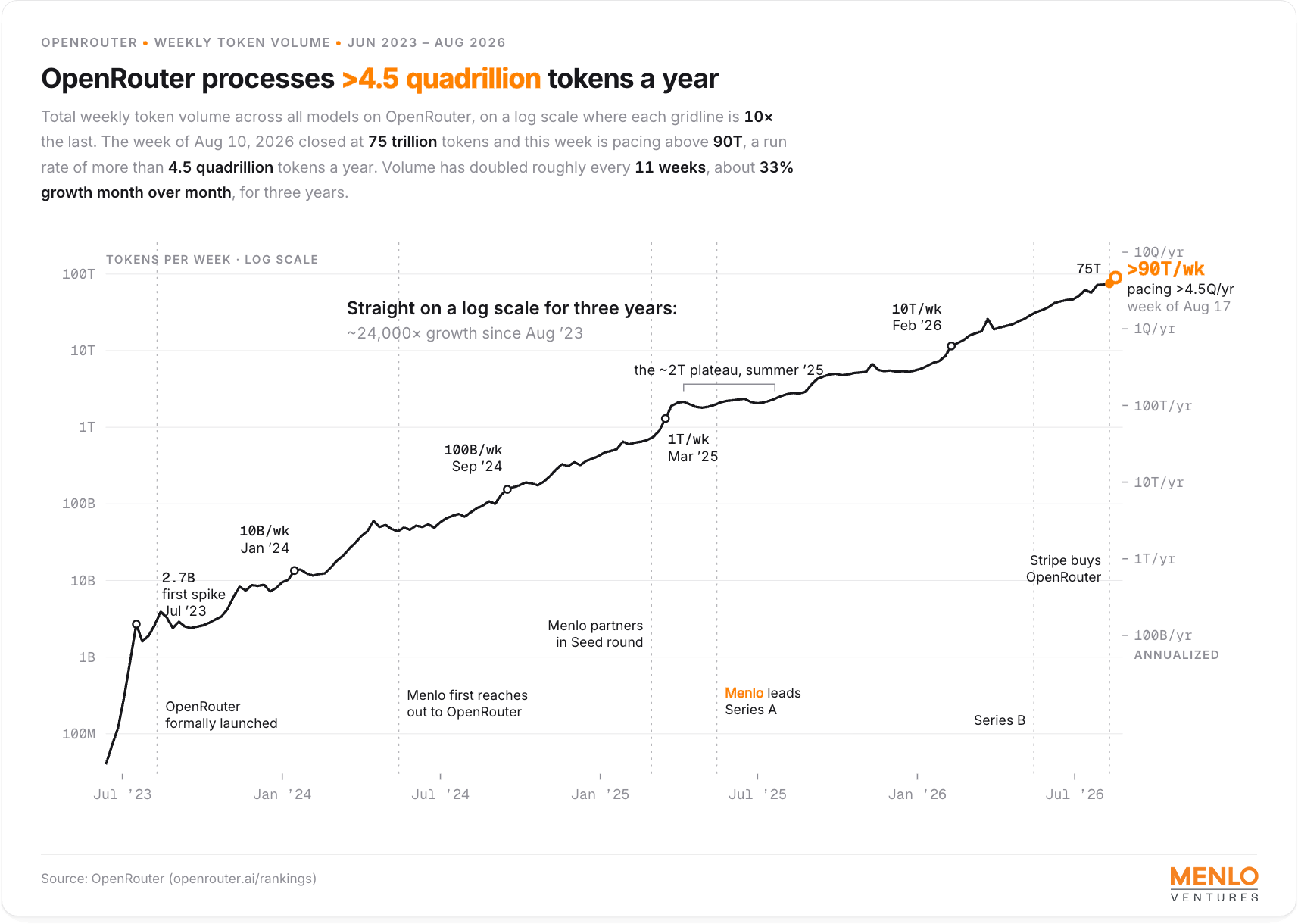
Stripe has been moving deeper into AI infrastructure for years. Payments, billing, identity, and agent tooling are all part of the AI application stack. Bringing OpenRouter in-house gives Stripe a direct connection to the model usage patterns of developers. It also creates a natural opportunity to combine model routing with payment workflows. For example, a developer might use Stripe to bill their end customers per token, while OpenRouter handles the upstream model calls. The public announcement did not include a detailed product roadmap, but the strategic direction is clear: Stripe wants to be more than the payments layer for AI applications; it wants to be part of how AI services are delivered and metered.
There is also a technical fit. OpenRouter already solves problems like metering, rate limiting, and fallback handling. Those are similar to the problems payment gateways solve every day: scale, reliability, and graceful failure. From Stripe's perspective, acquiring a popular model router is less about shutting down a standalone tool and more about embedding it into a broader AI commerce platform.
What the OpenRouter Stripe Acquisition Signals for AI API Users
For existing OpenRouter users, acquisitions naturally bring uncertainty about the roadmap. The product may continue to run as before, but its priorities will inevitably align with the acquirer's goals. That does not mean OpenRouter will disappear overnight, but it does mean the things you rely on today could change: pricing, model availability, support levels, or the focus of the developer experience.
The biggest risk for production users is not an immediate shutdown. It is gradual drift. A model router has to stay neutral. If the acquirer starts steering customers toward certain providers or deprioritizing models with low margins, the value proposition changes. Teams that depend on a consistent model lineup need to plan for that possibility before the product roadmap becomes clear.
This is a good moment to do an infrastructure review. Document how you use OpenRouter today: which models you call, which provider-specific features you depend on, and how much of your application is coupled to OpenRouter-specific conventions. That information is the foundation for any migration decision.
OpenRouter Alternative: Understanding Your Options After the Acquisition
The phrase openrouter alternative describes more than just another API proxy. It describes a category of tools that give you multi-provider access without locking you into the commercial direction of a single company. A good alternative should preserve the best parts of OpenRouter: one API, broad model coverage, and simple billing. But it should also give you transparency and portability.
Why the OpenRouter Stripe Acquisition Has Developers Evaluating Alternatives
Vendor lock-in is gradual. You start by using one API, then you wrap helper functions around it, then your telemetry is tied to it, and eventually the switching cost feels too high. An acquisition is a natural trigger to ask a hard question: what would this workload look like if the service changed pricing or dropped a model tomorrow?
Developers are also concerned about model access. OpenRouter aggregates many models, but those relationships sit behind one commercial entity. If the new owner decides to favor specific providers, the list of available models could shrink. For teams building products on top of specific models, that is an operational risk. An independent unified gateway keeps the model market more open.
CCAPI: A Unified AI API Gateway Built for Multi-Provider AI Access
CCAPI is a unified AI API gateway designed for multi-provider access. It gives you one API key to connect to major model providers like OpenAI, Anthropic, and Google, plus access to specialized models for text, image generation, audio, and video generation. Instead of maintaining separate SDKs and accounts, you send requests to one endpoint and let CCAPI handle the routing.
Two differentiators matter most after a major acquisition: transparent pricing and zero vendor lock-in. You can inspect the model catalog to see which providers are supported and check the pricing page to understand costs before you commit. That kind of predictability is essential when you are building systems designed to survive vendor changes.
AI Model Routing, Explained
To understand why a unified gateway is a reliable alternative, it helps to understand what the routing layer actually does. AI model routing is not just a reverse proxy. It is a translation layer between the differences in provider-specific APIs and the stable interface your application needs.
How a Unified AI API Gateway Works Under the Hood
When your application sends a request to a gateway like CCAPI, the gateway does several things. First, it authenticates your request and checks account limits. Second, it normalizes the request into a canonical format. Provider APIs use different names for the same concepts: max_tokens in one API, max_completion_tokens in another, and different schemas for tool calling. A gateway absorbs those differences.
Third, the gateway selects a model based on routing rules. You might specify a primary model and a list of fallbacks. In a simplified form, the request could look like this:
{
  "model": "openai/gpt-4o",
  "messages": [{"role": "user", "content": "Summarize this incident report"}],
  "fallback_models": ["anthropic/claude-3-5-sonnet", "deepseek/deepseek-chat"]
}
The gateway passes the payload to the primary provider. If that provider returns an error or times out, the gateway retries with the next model in the list. Finally, the response is converted back into a common schema so your application does not have to handle each provider's quirks. This is how you can switch models without rewriting every call.
What Multi-Provider AI Access Really Means for Your Workflow
The practical benefit of multi-provider access is resilience. If a primary provider has an outage, a gateway can route automatically to a fallback model. This reduces downtime and gives you more flexibility.
Multi-provider access also helps with cost and quality. A small Qwen model might be sufficient for classification, while a larger reasoning model from DeepSeek handles complex code generation. A multimodal task might use GPT Image for a visual response and Suno API for an audio asset. You do not need to integrate each provider separately. Instead, you choose the best model for the task and let the gateway manage the provider-specific complexity.
How to Choose an OpenRouter Alternative
Choosing a unified AI API gateway is a procurement decision as much as a technical decision. You should evaluate it carefully because it will become part of your infrastructure.
Key Criteria for Comparing Unified AI API Gateways
Use these criteria to compare options, regardless of which product you choose.
| Criterion | What to look for | Why it matters |
|---|---|---|
| Model coverage | Number of providers and model types | You need options for today's workloads and future features |
| API compatibility | OpenAI-style interface, tool support, streaming | A familiar interface reduces migration effort |
| Pricing transparency | Published prices, credit expiration, markup clarity | Unexpected markup can break your cost model |
| Latency and reliability | Uptime SLA, fallback behavior, time to first token | Production traffic demands predictable response times |
| Security | Data handling, encryption, logging policies | Sensitive prompts must not be stored unnecessarily |
| Migration ease | SDK quality, docs, endpoint compatibility | Faster testing means you can de-risk the switch sooner |
CCAPI aligns with these criteria. It supports an OpenAI-compatible API and gives you access to a wide model catalog. The model catalog shows what is available, and the pricing page avoids the “contact us” wall that slows down many infrastructure decisions.
Lessons from Production: Common Migration Pitfalls to Avoid
Having migrated services between model gateways, the biggest problem is rarely the API key. It is edge cases. Different providers have different parameter defaults. One model may ignore frequency_penalty, while another rejects logprobs. If you send the same JSON to a new gateway, the gateway may interpret the request differently.
Response formats also vary. A model may return clean JSON on one provider and a text-plus-JSON mix on another, even when you request structured output. Tool calling is even more fragile because OpenAI, Anthropic, and Google use different schemas for function arguments. Before switching, create a test suite that covers long prompts, empty responses, tool calls, streaming, and concurrent requests.
Rate limits are another hidden issue. A gateway may have its own limits while each upstream provider also has separate limits. You might be under the gateway threshold yet still hit a provider-level 429 error. Production migration testing should include load tests, not just a single manual request.
Industry Best Practices for Multi-Provider AI Access
Once you understand the pitfalls, you can build a multi-provider strategy that survives change.
Avoiding Vendor Lock-In with a Unified AI API Gateway
The core principle is to depend on abstractions, not specific provider features. Use logical model names in your code. Instead of calling gpt-4o directly, call main-chat and map that to the current model in configuration. Keep provider-specific parameters out of your business logic.
A unified AI API gateway is a strong abstraction layer, but it is not magic. You still need to audit your code for direct provider dependencies. The MCP ecosystem helps with portability. An MCP server exposes tool use and model routing in a standardized way, so clients like Claude Code can connect without knowing which provider is behind the request.
Performance Benchmarks: Latency, Uptime, and Throughput
Benchmarking a unified gateway requires the same discipline as benchmarking any API service. Measure latency at several percentiles, not just the average. For streaming workloads, time to first token is more important than total response time. For batch jobs, throughput and error rate matter.
Run a controlled experiment. Send the same workload to the gateway and to a direct provider API. Compare p50, p95, and p99 latencies. The gateway will add some overhead, often measured in milliseconds, but that overhead may be worth it when it prevents a provider outage from affecting your users. Track uptime over a realistic period and test how the gateway handles provider failures.
When to Use a Unified Gateway (and When Not To)
A unified gateway makes sense for most teams that need to compare models, support multiple customers, or avoid being locked into a single provider. It is especially useful for early-stage products where speed matters more than squeezing out the last millisecond of latency.
There are cases where direct provider APIs are still better. If your workload is extremely latency-sensitive and you rely on provider-specific features, the gateway may add unnecessary overhead. If you generate massive token volumes through one model and have negotiated a custom contract, direct integration might be simpler. Even then, keep a thin internal abstraction so you can migrate later if the vendor relationship changes.
From OpenRouter to CCAPI: A Practical Migration Path
If you decide to move from OpenRouter to CCAPI, treat the migration as a system change, not a search-and-replace. A phased approach reduces the risk of subtle behavioral differences.
Step 1: Audit Current Model Usage and Dependencies
Start with your logs. Identify which models your application calls, how often, and which response features you rely on. Do you use vision inputs? Structured outputs? Tool calls? Streaming? List the provider-specific parameters in each request and mark which ones are essential. This audit becomes your migration checklist.
Step 2: Test Endpoints Side by Side
Create a small test harness that sends the same request to OpenRouter and CCAPI. Capture latency, token usage, output content, and error messages. Compare results manually. If the models are nondeterministic, run multiple samples to evaluate quality.
Pay close attention to tool calling and JSON responses. You need to know whether the new gateway preserves the exact format your code expects. Also verify that your usage dashboard matches the pricing page. If the billing behavior is unclear before you go live, it will only be more painful afterward.
Step 3: Roll Out Gradually and Monitor
Do not switch all traffic on day one. Start with a low-risk, non-customer-facing workload. Run it through CCAPI for a few days and monitor correctness, latency, and cost. When you are comfortable, expand to a second workload.
Use feature flags to make the migration reversible. If something breaks, you can toggle back to OpenRouter or another provider. Set alerts for error rate, latency, and token spend. The migration is not finished when traffic is on the new gateway; it is finished when you have observed enough real conditions to be confident.
Conclusion
The OpenRouter Stripe acquisition is a reminder that no platform is permanent. What matters is how much flexibility you have built into your own systems. By understanding how AI model routing works and evaluating alternatives before you need them, you can make decisions from a position of stability rather than urgency.
A unified AI API gateway like CCAPI provides broad model access, transparent pricing, and no vendor lock-in. Whether you need text, image generation, or video generation, it gives you a practical way to keep your workloads portable. Start by auditing your current usage, test endpoints side by side, and roll out gradually. That approach will prepare you for whatever direction the market takes next.