
Fallback model for Nano Banana Pro
Nano Banana Pro Fallback: Building a Resilient AI Image Generation Pipeline
AI image generation has moved from experimental demos to production infrastructure. Teams rely on models like Nano Banana Pro to generate marketing visuals, product mockups, design assets, and creative variations from text prompts. But production systems fail. Providers experience outages, APIs return 429 rate-limit errors, and requests sometimes time out. When that happens, the entire workflow stalls unless you have a Nano Banana Pro fallback strategy in place.
In this deep-dive article, we'll examine what AI model fallback means, why image generation pipelines need it, and how to build a multi-provider fallback system around Nano Banana Pro using CCAPI, a unified multimodal AI API gateway. You'll learn how to configure fallback chains, define routing rules, test failure scenarios, and monitor the whole system so your application stays available even when one model goes down.
1. AI Model Fallback Basics: Why a Fallback Model Matters
1.1 What Is an AI Model Fallback?
A fallback model is a secondary AI model that automatically takes over when the primary model fails, times out, or becomes unavailable. Instead of letting a request fail and showing the user an error, the API layer redirects that request to another capable model. This is similar to how a content delivery network routes traffic to a healthy edge server when one node goes offline.
In practice, a fallback model is not a downgrade. It is a safety net. If your primary model is Nano Banana Pro for image generation, a fallback model could be another image generation model that accepts similar prompts and returns comparable output. The user does not need to know which model served the request; they simply get the image they asked for.
1.2 The Cost of Provider Outages and Rate Limits
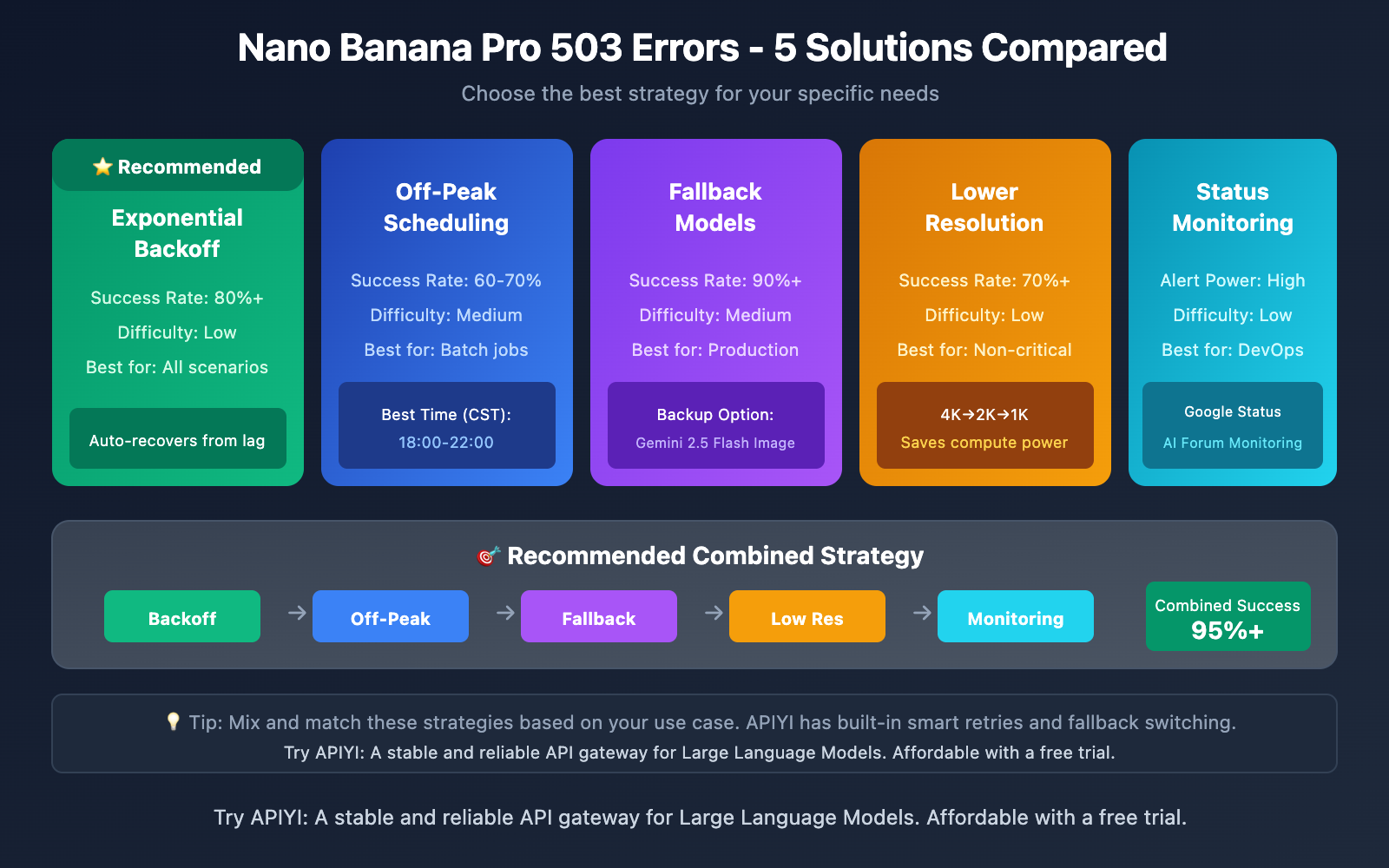
Every AI provider, no matter how reliable, will experience outages. Cloud services degrade, network partitions happen, and upstream infrastructure fails. For API providers, common failure signals include:
- HTTP 429: Too Many Requests, meaning you have hit a rate limit.
- HTTP 5xx: Server errors such as 500, 502, or 503.
- Request timeouts when the provider takes too long to respond.
- Connection errors when the API endpoint is unreachable.
For a production AI application, these errors are not just minor inconveniences. If your image generation workflow depends on a single provider, an outage means no images, delayed campaigns, broken user experiences, and lost revenue. The more critical the workflow, the more expensive the downtime becomes.
1.3 Why Nano Banana Pro Needs a Fallback Model
Nano Banana Pro is designed for high-quality image generation, but image workloads are especially sensitive to availability problems. Generating an image requires significantly more compute than running a text completion, so requests are more likely to hit rate limits during usage spikes. A provider can also become overloaded when many users are generating images at the same time.
If you are building a customer-facing application, you cannot afford to show an error every time the primary provider has a hiccup. A Nano Banana Pro fallback ensures that requests are still fulfilled during high-demand periods. It transforms image generation from a fragile single-provider dependency into a resilient pipeline.
2. Understanding Nano Banana Pro and Its Failure Scenarios
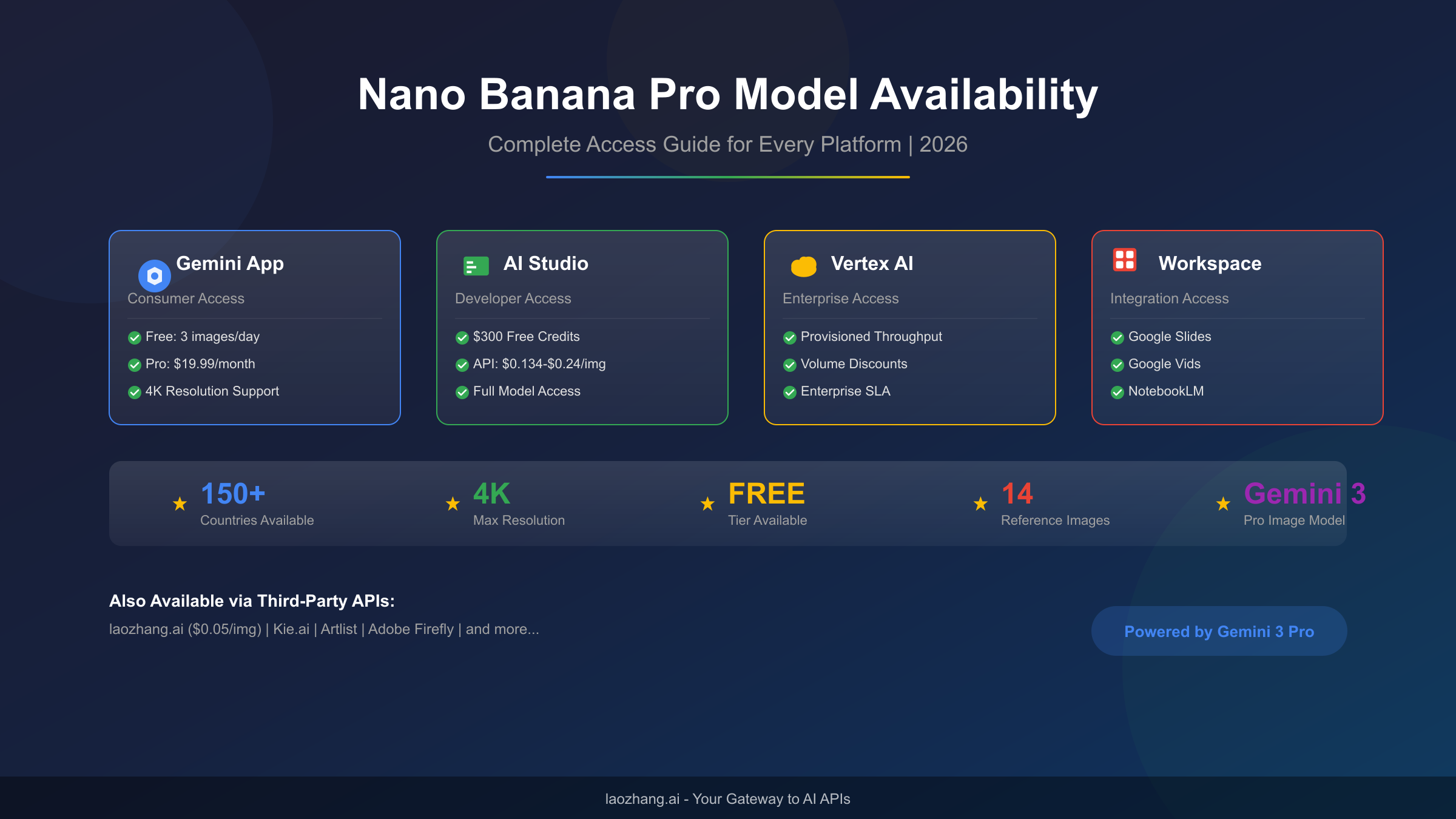
2.1 Nano Banana Pro Capabilities and Typical Use Cases

Nano Banana Pro is a powerful image generation model that excels at transforming text prompts into detailed visual assets. Typical use cases include:
- Marketing and social media visual creation.
- E-commerce product photography variations.
- Concept art and creative design workflows.
- Multimodal prompts that combine text descriptions with reference images.
- Rapid prototyping of visual ideas.
Because of these use cases, Nano Banana Pro is often embedded into larger content pipelines. A designer might generate a campaign image, upscale it, and then resize it for different platforms. If the generation step fails, every downstream step stops. That is why fallback routing needs to happen as early as possible.
2.2 Common Error Responses and When Fallback Triggers
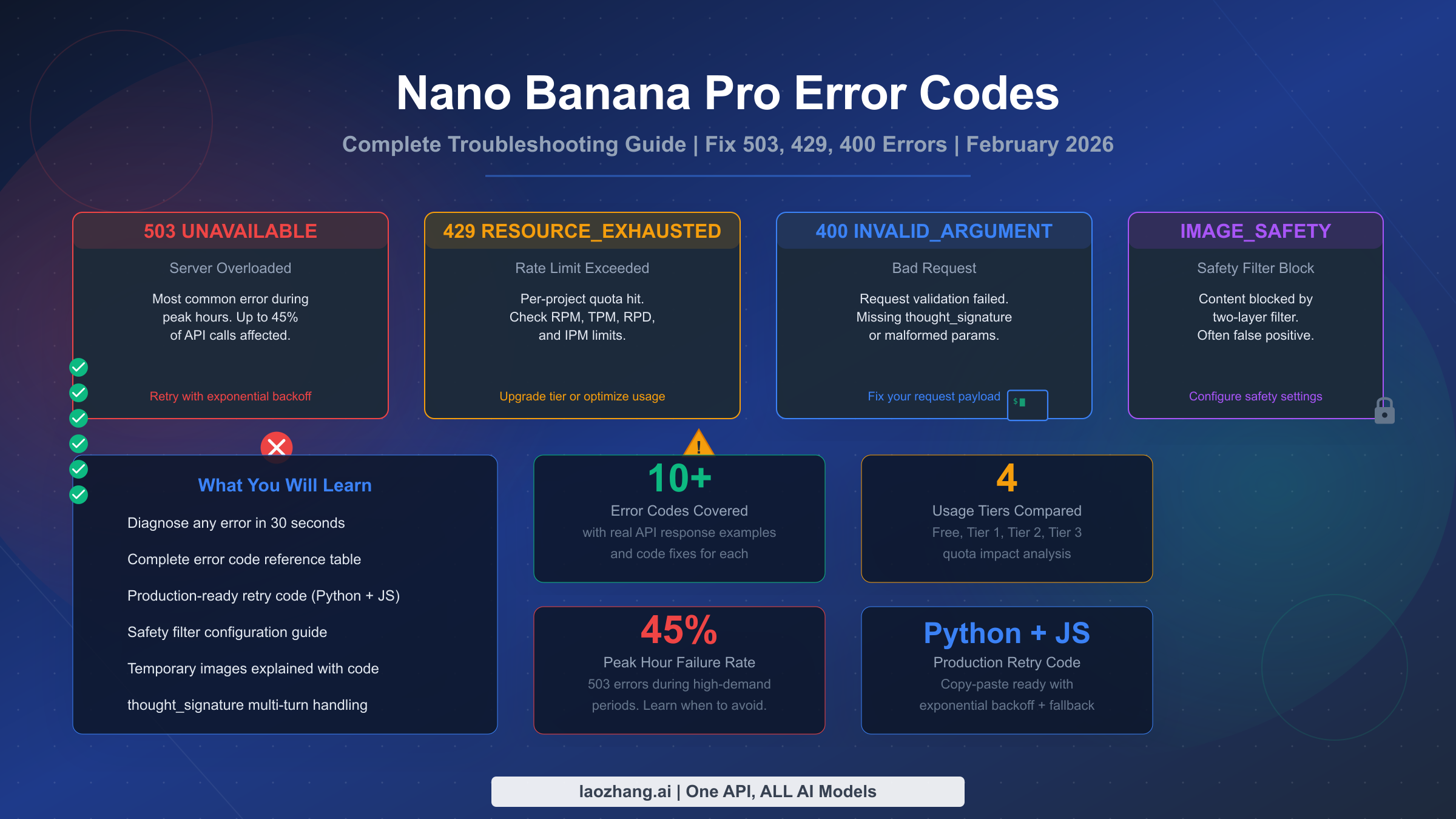
Not every error should trigger a fallback. You need to distinguish between transient errors and permanent failures. A well-designed fallback system maps specific error codes to routing rules. For example:
| Error Type | Example | Should Fallback Trigger? |
|---|---|---|
| Rate limit | 429 | Yes, after retry limit is reached |
| Server error | 500, 502, 503 | Yes |
| Timeout | Request takes too long | Yes |
| Invalid request | 400 | No, fix the request instead |
| Authentication error | 401 | No, check API key |
This mapping matters because you do not want to waste fallback capacity on requests that will never succeed. A 400 error caused by a malformed prompt will fail on every provider. But a 429 error might succeed on a different provider with lighter load.
2.3 Identifying Single Points of Failure in Image Generation Workflows
A single-model workflow is a fragile chain. If your application sends every prompt directly to Nano Banana Pro and a provider incident occurs, the entire pipeline fails at once. Downstream tasks such as image upscaling, text overlays, and delivery to users never get the input they need.
This is a classic single point of failure. You can reduce the risk by introducing a fallback model that can handle the same type of request. Instead of one brittle path, you create a fallback chain with multiple possible routes. The goal is not to replace Nano Banana Pro, but to make the entire image generation pipeline more robust.
3. Multi-Provider Fallback Routing: How It Works
3.1 The Architecture of Multi-Provider Fallback Routing
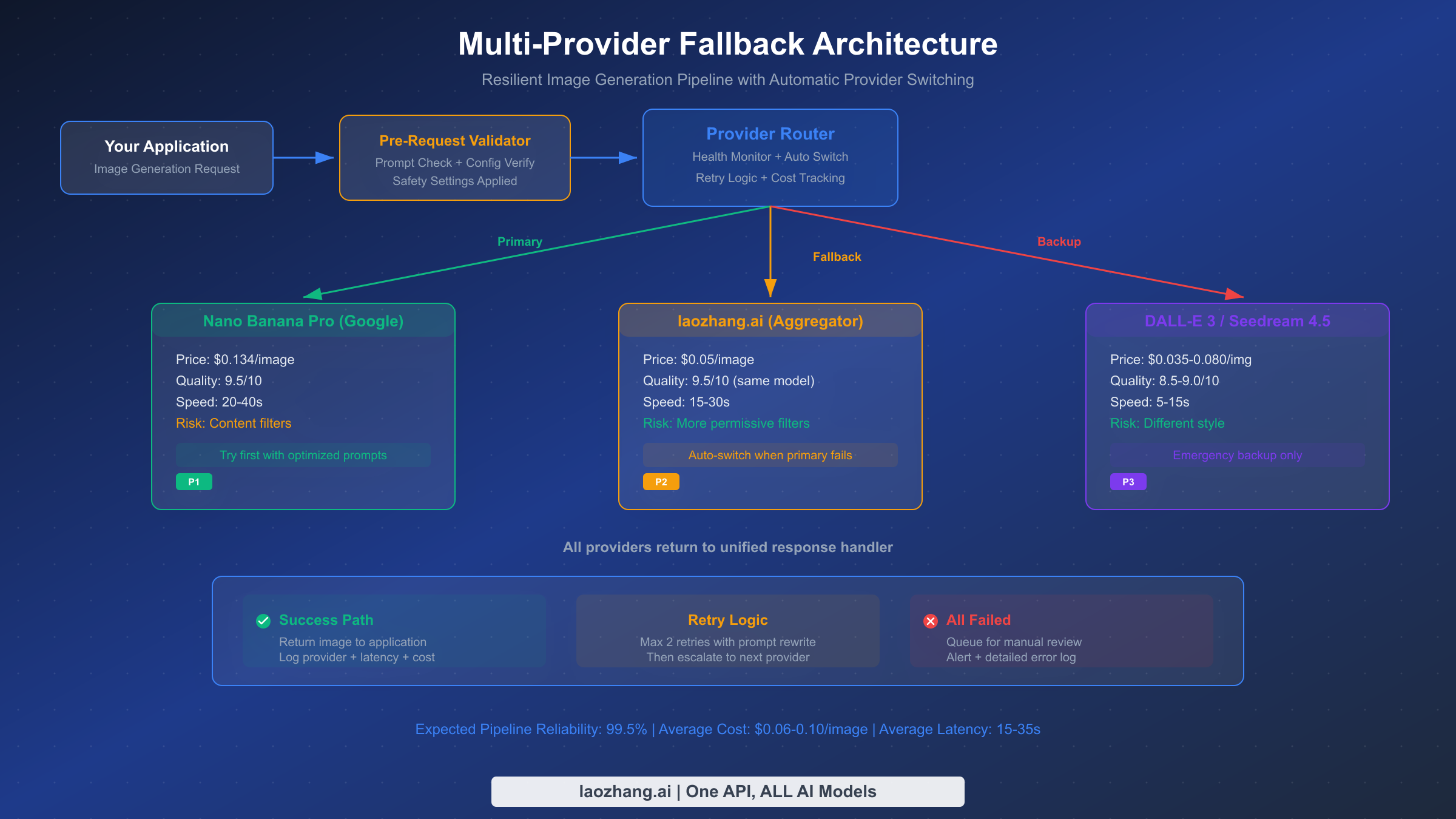
Multi-provider fallback routing is an architectural pattern where a request is sent to a sequence of providers until one succeeds. Here is the basic flow:
- A request arrives at the API gateway.
- The gateway forwards the request to the primary model, Nano Banana Pro.
- If the request succeeds, the response is returned to the caller.
- If the request fails or times out, the gateway checks the failure conditions.
- If the failure is retryable, the gateway routes the request to the fallback model.
- If the fallback model also fails, the gateway can continue down the chain or return an error.
This pattern works because each provider has independent infrastructure. A rate limit on one provider does not affect another provider. A regional outage on one cloud platform does not necessarily impact a different platform.
3.2 Routing Rules: Latency, Cost, and Quality Priorities
When you configure a fallback chain, you need to decide what you are optimizing for. There are three common priorities:
- Latency: Always choose the fastest available model, even if the output quality is slightly lower.
- Cost: Prefer the cheapest provider that can complete the request, while still maintaining an acceptable quality bar.
- Quality: Always try the highest-quality model first, and only fall back to lower-quality options when necessary.
These priorities are not mutually exclusive. You might use a primary-plus-fallback strategy where Nano Banana Pro handles quality work, and a faster or cheaper fallback model covers the overflow. The key is to define explicit routing rules so the gateway knows what to do in every scenario.
3.3 How CCAPI’s Unified Gateway Orchestrates Fallbacks
CCAPI is a unified multimodal AI API gateway that connects to a wide range of providers, including OpenAI, Anthropic, Google, and others, for text, image, audio, and video generation. Instead of integrating with each provider separately, you use one unified endpoint. CCAPI handles the authentication, request transformation, and routing for you.
This architecture makes multi-provider fallback much simpler. You do not need to write custom adapter code for every provider. You define a fallback chain, and CCAPI manages the orchestration. One of the biggest advantages is zero vendor lock-in: if a new image generation model launches, you can add it to your fallback chain without rewriting your application.
To see which models are available in the gateway, check the CCAPI models page. It lists every provider and model you can use in your routing rules.
4. Step-by-Step: Setting Up Nano Banana Pro Fallback with CCAPI
4.1 Prerequisites: API Keys and Provider Accounts
Before you start, you need a few things:
- An active account with the provider that offers Nano Banana Pro.
- API keys for that provider.
- A fallback provider account and API key for another image generation model.
- A CCAPI account with an API token.
If you have not created a CCAPI token yet, you can generate one on the console token page. You will need this token to authenticate all requests to the unified gateway.
4.2 Configuring Nano Banana Pro as the Primary Model
Once you have your credentials, the next step is to configure Nano Banana Pro as the primary model. With CCAPI, you simply send a standard request to the unified endpoint and specify the model name. Here is an example of an image generation request:
{
  "model": "nano-banana-pro",
  "prompt": "A cinematic product shot of a smart watch on a dark reflective surface",
  "n": 1,
  "size": "1024x1024"
}
In this example, the request is sent to CCAPI’s unified endpoint, and CCAPI routes it to Nano Banana Pro. You can also set output format, quality parameters, and other provider-specific options. The key point is that your application only talks to one API endpoint, not to each provider individually.
4.3 Defining Fallback Models with CCAPI Routing Rules
After configuring the primary model, you need to define what happens when it fails. In CCAPI, you can define a fallback chain by specifying an ordered list of models. CCAPI will try the first model, and if it fails under the defined conditions, it will move to the next model.
A fallback chain for image generation might look like this:
{
  "model": "nano-banana-pro",
  "fallback_chain": [
    "fallback-image-model-a",
    "fallback-image-model-b"
  ],
  "fallback_conditions": ["rate_limit", "server_error", "timeout"]
}
The fallback conditions list tells CCAPI when to fail over. If Nano Banana Pro returns a 429 rate-limit error, the request is automatically sent to the first fallback model. If that model is also unavailable, the request proceeds to the second fallback model. This creates a robust multi-provider fallback routing architecture.
4.4 Testing Fallback Behavior in a Sandbox Environment
Before going to production, you should test fallback behavior under realistic conditions. Create a sandbox environment where you can safely simulate failures. For example:
- Use an invalid API key for the primary model to force an authentication error.
- Configure an intentionally low rate limit to trigger 429 responses.
- Point the primary model to a fake endpoint to simulate a server error.
- Set a very short timeout to simulate slow responses.
For each test case, verify that the fallback model receives the request and returns a valid image. This is also a good time to check the response metadata. You should be able to tell which model actually served each request, so you can confirm the fallback chain is working as expected.
4.5 Monitoring Fallback Events and Usage Metrics
Fallback is not a fire-and-forget configuration. You need to know how often fallback triggers and why. CCAPI provides logs and analytics that show request-level details, including the model used, response time, and error codes.
Monitor these events closely:
- Fallback trigger count: How many requests were redirected to a fallback model?
- Primary model error rate: Is the primary provider becoming less reliable?
- Fallback success rate: Are fallback models actually completing requests successfully?
- Cost per request: Are fallback requests more expensive than primary requests?
If you see fallback triggers spiking, that is a signal that the primary provider is having issues. You may need to adjust your rate limit handling, increase retry backoff, or even switch to a different primary model.
5. Best Practices for Selecting a Fallback Model
5.1 Matching Model Capabilities to Your Fallback Needs
The most important rule for fallback selection is that the fallback model should be able to handle the same type of prompt as the primary model. If Nano Banana Pro is your image generation model, the fallback must also be an image generation model. A text-only model is useless as a fallback for image generation.
Look for a fallback model that understands similar prompt formats and supports similar output sizes. If you regularly generate 1024x1024 images, your fallback should support that resolution too. Otherwise, you will need to add an image upscale or resizing step after generation.
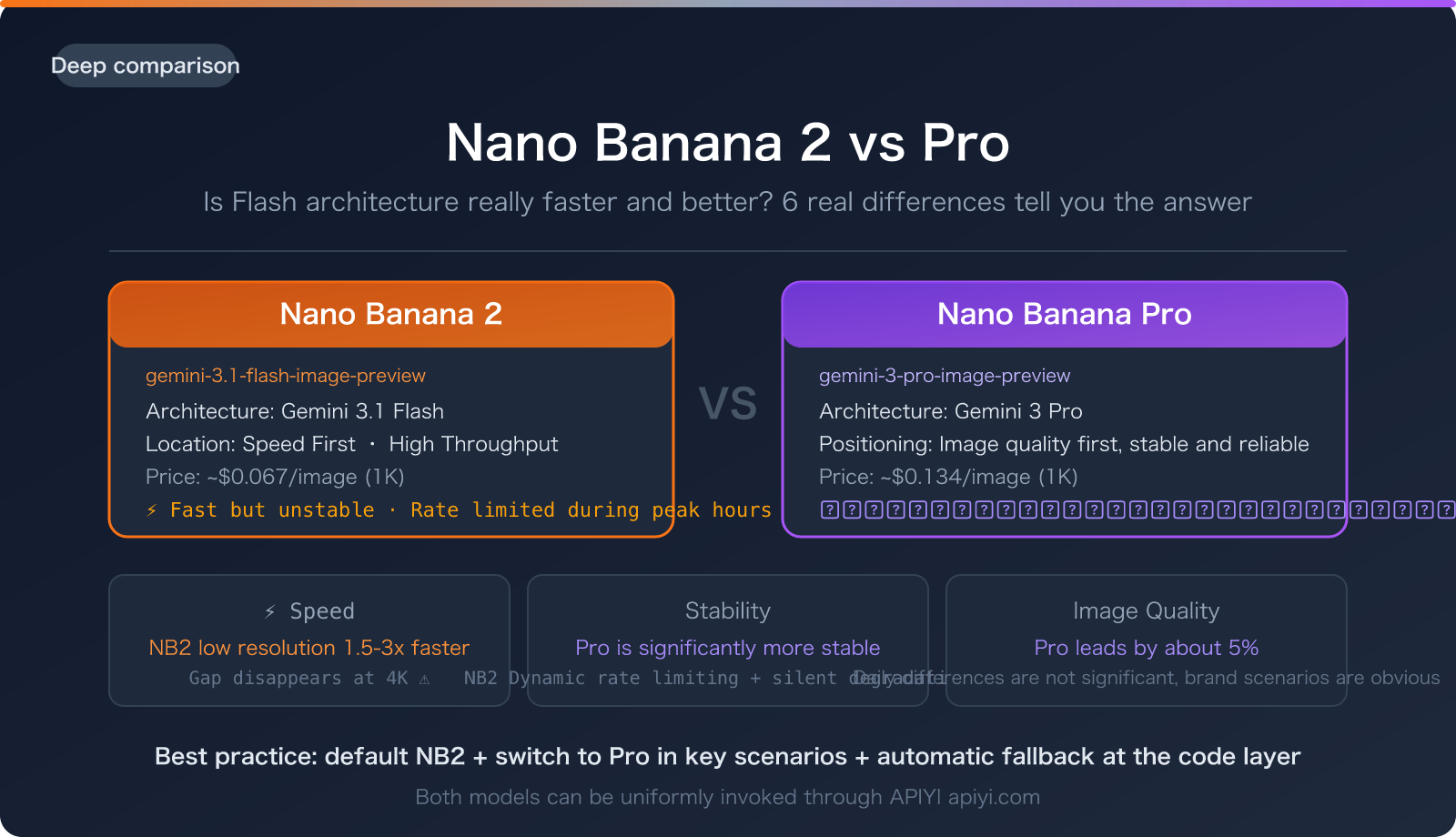
5.2 Balancing Image Quality, Speed, and Cost
When comparing fallback candidates, create a simple scoring framework. Evaluate each candidate on three axes:
- Quality: How well does the model match the style and fidelity of Nano Banana Pro?
- Speed: What is the expected latency for a typical image generation request?
- Cost: What is the price per image, and how does it compare to the primary model?
Here is an example scoring table:
| Model | Quality Score | Average Latency | Cost per Image | Overall Fit |
|---|---|---|---|---|
| Fallback A | 9/10 | 3.2s | $0.04 | High |
| Fallback B | 7/10 | 1.8s | $0.02 | Medium |
| Fallback C | 8/10 | 4.5s | $0.06 | Medium |
The best fallback is not necessarily the cheapest or the fastest. It is the model that meets your minimum quality bar while preserving a good user experience. If you are building a consumer app, quality consistency matters more than saving a fraction of a cent.
5.3 Using Nano Banana Pro Fallback in a Multi-Tier Chain
A single fallback model is often enough, but for critical production workloads, you should build a multi-tier fallback chain. Each tier can have a different priority:
- Tier 1: High-quality fallback that closely matches Nano Banana Pro output.
- Tier 2: Low-cost fallback for non-critical requests or batch processing.
- Tier 3: Fast fallback for time-sensitive requests where latency is more important than quality.
This approach lets you handle different failure scenarios without sacrificing too much quality or spending too much money. In CCAPI, you can configure this simply by listing models in order of priority.
5.4 Updating Your Fallback Chain as New Models Release
AI models evolve quickly. A model that was not available six months ago might now be the best fallback option for your workload. Make it a habit to review your fallback chain every few months.
The beauty of using a unified gateway like CCAPI is that you can swap models without changing your application code. You only need to update the routing configuration. This makes your fallback strategy future-proof and reduces the risk of getting locked into a single provider.
6. Real-World Implementation: From Prototype to Production
6.1 Case Scenario: Handling a Nano Banana Pro Outage
Imagine a marketing team that uses Nano Banana Pro to generate campaign images. They have a dashboard where they upload product photos, write a prompt, and receive multiple edited images. One afternoon, the provider starts returning 503 errors because of an infrastructure incident.
Without a fallback, every dashboard request fails. The campaign deadline is at risk. But with a fallback chain configured, CCAPI automatically redirects the requests to a secondary image generation model. The team sees a slight change in image style, but they receive their images on time. The system continues to work, and the outage is invisible to the end user.
Behind the scenes, the request goes through the unified gateway, is forwarded to the fallback provider, and the response is returned to the dashboard. The only visible effect is a small delay and a slightly different visual style.
6.2 Lessons from Production: What Can Go Wrong
In production, fallback systems uncover some uncomfortable truths. Here are common issues we have seen:
- Inconsistent output: Fallback models interpret prompts differently. A prompt that produced a photorealistic image on Nano Banana Pro might produce an illustrated style on the fallback model. This can be jarring if the output is meant to match a brand identity.
- Slow failover detection: If the timeout is set too high, the user waits a long time before the fallback takes over. The request eventually succeeds, but the experience is poor.
- Cost spikes: A low-quality fallback model may produce acceptable images, but if it is used heavily, the per-request cost can add up quickly.
These lessons reinforce the need for careful testing and monitoring. A fallback model is not a magic solution. It is another component that needs to be managed.
6.3 Designing a Resilient Image Generation Pipeline with CCAPI
A resilient image generation pipeline should be built on multiple layers. You need a reliable primary model, a well-defined fallback chain, and clear monitoring. CCAPI supports this by providing a single integration point for many providers, transparent pricing, and no vendor lock-in.
With CCAPI, you can design your pipeline to route around failures at the model level, and even at the provider level. If your primary provider has a regional outage, the request goes to a different provider that is still healthy. This is only possible when you have a multi-provider strategy in place.
7. Common Pitfalls to Avoid with AI Model Fallback
7.1 Relying on a Single Fallback Provider
A common mistake is moving from one single point of failure to another. If you use only one fallback provider and that provider has an outage at the same time as your primary provider, you are back to square one. True reliability requires a diverse fallback pool across different providers.
7.2 Ignoring Output Consistency Differences
Different image models have different strengths and styles. Some models are better at photorealistic output, while others excel at illustrations or 3D renders. A fallback model should be able to handle similar prompts, but you should still normalize prompts to reduce variability.
Prompt normalization means specifying style, tone, composition, and technical parameters explicitly. Instead of a vague prompt like "a picture of a car," use "a photorealistic side view of a red sedan on a wet city street at night, shot with a 50mm lens." This gives the fallback model more guidance and increases the chance of consistent output.
7.3 Missing Timeout or Retry Configurations
Without explicit timeout rules, requests can hang for a long time. This is especially dangerous in image generation, where a single request can run for several seconds. If the primary model is slow, the fallback never gets a chance because the request is still waiting.
Set explicit timeout values and retry limits. If a request takes too long, treat it as a failure and trigger the fallback. The faster you fail over, the better the user experience.
7.4 Failing to Monitor Fallback Performance
Fallback paths need the same level of monitoring as primary paths. Track fallback rates, error rates, and costs separately. If you do not know that your fallback is triggering on 40% of requests, you will not understand why your average latency and cost have increased. Monitoring is not optional.
8. Testing, Monitoring, and Improving Your Fallback Strategy
8.1 How to Benchmark Fallback Model Performance
You should benchmark fallback models before adding them to your production chain. Create a set of representative prompts and run them against each candidate model. Measure:
- Success rate.
- Time to first response.
- Output quality based on human evaluation or automated metrics.
- Consistency across repeated runs.
Side-by-side comparisons between Nano Banana Pro and a fallback model will reveal tradeoffs that might not be obvious from documentation alone.
8.2 Key Metrics: Failure Rate, Latency, and Cost per Request
For any reliable AI API gateway setup, you should track these essential metrics:
| Metric | What It Tells You |
|---|---|
| Primary failure rate | How often the primary model fails |
| Fallback trigger rate | How often requests are redirected |
| p95 latency | The worst-case user experience |
| Cost per successful request | The true cost of image generation |
| Model availability | Which providers are up or down |
These metrics give you a complete picture of your fallback system. If the fallback trigger rate is too high, your primary model may no longer be the right choice.
8.3 Building a Reliable AI API Gateway Monitoring Setup
CCAPI provides logs and analytics that capture every request. You can filter by model, error code, and success status. To stay proactive, set up alerts for unusual patterns, such as:
- Fallback trigger rate exceeding a threshold.
- Error rate on the primary model increasing by a certain percentage.
- Average cost per request trending upward.
A monitoring setup like this ensures that you are not surprised by an outage. You will see the signals early and can adjust your fallback chain before users are affected.
9. When to Use a Fallback Model for Nano Banana Pro (and When Not To)
9.1 Pros and Cons of Multi-Provider Fallback
Multi-provider fallback is not always the right choice. Here is a balanced look at the tradeoffs:
Pros:
- Higher availability and uptime for user-facing applications.
- Better resilience during provider outages.
- More negotiating power and flexibility because you are not locked in.
Cons:
- Added configuration complexity.
- Output variability between models.
- Potential cost increases from using multiple providers.
For most production applications, the benefits outweigh the drawbacks. But for simple prototypes and internal tools, a fallback system may be overkill.
9.2 Security and Compliance Considerations
Before sending requests to a fallback provider, consider data handling implications. If your prompts contain sensitive information, such as customer data or confidential product designs, you need to ensure that every provider in your fallback chain complies with your security policies.
Some providers have different data retention policies or use training data in different ways. You should review the terms of each provider in your fallback chain, especially in regulated industries like healthcare or finance.
9.3 Making the Right Fallback Decision for Your Use Case
Here is a simple decision guide:
- Use a fallback if you have high-traffic production workloads, user-facing applications, or strict availability requirements.
- Use a fallback if you are integrating with multiple downstream systems that depend on image generation.
- Do not use a fallback if you are running internal experiments, batch jobs that can be retried manually, or workflows where output consistency is more important than availability.
In many cases, the cost of implementing fallback is small compared to the cost of downtime. With CCAPI, you can get started without building complex integrations yourself. Check out CCAPI pricing to understand the cost structure, and if you need to add credits, you can do so via the console top-up page.
Final Thoughts
Nano Banana Pro is a powerful image generation model, but no single model can guarantee 100% uptime. A well-designed Nano Banana Pro fallback strategy turns image generation into a resilient, multi-provider pipeline. Start with a clear understanding of your failure scenarios, configure routing rules that match your priorities, and monitor the system closely once it is in production.
CCAPI makes this process easier by providing a unified endpoint for multiple AI providers, transparent pricing, and zero vendor lock-in. You can build a fallback chain that keeps your application alive during outages, rate limits, and latency spikes. In the world of production AI, resilience is not a nice-to-have. It is the difference between a system that breaks and a system that your users can rely on.